> ## Documentation Index
> Fetch the complete documentation index at: https://docs.reelevant.com/llms.txt
> Use this file to discover all available pages before exploring further.
# Attribution Model
> How Reelevant distributes conversion credit across interactions using influenced revenue, attribution models, and per-interaction-type lookback windows
**Beta** — Attribution models and configurable attribution settings are currently in beta. Behaviour and available options may still change, and numbers may be refined as the feature matures.
## Before you begin
This page explains the attribution methodology behind the [Conversions dashboard](/product-guide/analytics/dashboards/conversions) and [Data Exploration](/product-guide/analytics/data-exploration). Configure the settings described here from [Analytics Settings](/product-guide/analytics/settings).
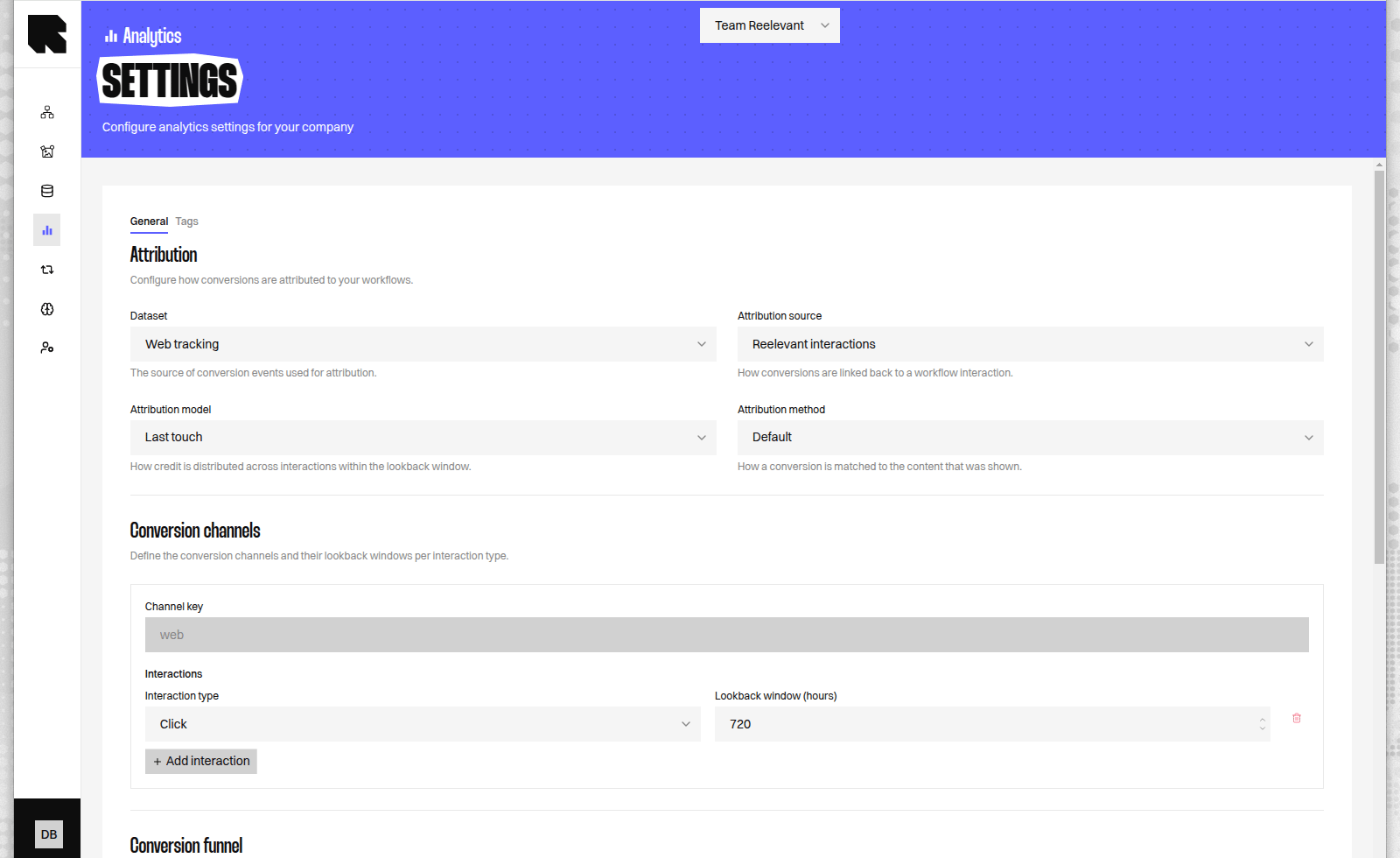 Attribution answers a single question: given a conversion, how much of its value should be credited to each Reelevant content interaction that preceded it.
## Influenced revenue versus direct revenue
Reelevant reports **influenced revenue** rather than attributed revenue. The distinction is intentional: a conversion typically involves several marketing efforts, so Reelevant quantifies its contribution instead of claiming the entire sale.
| Measure | Definition |
| -------------------------- | ------------------------------------------------------------------------------------------------------------------- |
| **Influenced Revenue** | Conversion value distributed across every qualifying interaction according to the selected attribution model. |
| **Direct Revenue** | Conversion value credited only to the last qualifying interaction before the conversion. |
| **Influenced Conversions** | Fractional conversion count distributed across qualifying interactions. Credits for one conversion always sum to 1. |
Exposing both measures lets you quantify assist value: the gap between influenced and direct revenue is the contribution of interactions earlier than the final one.
Conversions without any qualifying Reelevant interaction are excluded. A conversion is only credited when at least one interaction falls inside its lookback window, so direct and unattributed purchases never inflate influenced revenue.
## Attribution models
The attribution model determines how a conversion's value is distributed across its qualifying interactions. The model is a single global setting per configuration.
| Model | Distribution rule |
| ------------------------ | -------------------------------------------------------------------------------------------------------------------------------------------------------------------------- |
| **Last-touch** (default) | 100% to the last qualifying interaction; earlier interactions receive 0%. |
| **Linear** | Equal share to every qualifying interaction (`1 / n`). |
| **Decay** | Credit increases towards the conversion. For `n` interactions ordered oldest to newest, interaction at position `i` receives `i / (1 + 2 + … + n)`, i.e. `i / (n(n+1)/2)`. |
Last-touch is the default so that a configuration left unchanged reproduces classic last-click reporting, including when results are grouped by dimension.
### Worked example
A customer records three qualifying interactions before a conversion worth 100.
| Interaction | Last-touch | Linear | Decay |
| ----------- | ---------- | ---------- | ---------- |
| First | 0.00 | 33.33 | 16.67 |
| Middle | 0.00 | 33.33 | 33.33 |
| Last | 100.00 | 33.33 | 50.00 |
| **Total** | **100.00** | **100.00** | **100.00** |
Under decay the denominator is `1 + 2 + 3 = 6`, so the interactions receive `1/6`, `2/6`, and `3/6`. For every model, the credits for a conversion sum to the full conversion value, and the fractional conversion count sums to 1.
## Lookback windows per interaction type
An interaction earns credit only when it falls inside its lookback window — the interval before the conversion during which the interaction remains eligible. Reelevant resolves the window per interaction type, so click and view-through interactions can be credited within the same conversion using different windows.
| Interaction type | Signal | Default window |
| -------------------------- | --------------------------------------------- | ------------------- |
| **Click** | The customer clicked Reelevant content. | 720 hours (30 days) |
| **View-through (display)** | Reelevant content was served but not clicked. | 168 hours (7 days) |
The window is evaluated independently for each interaction, based on its type. A single conversion can therefore include a click from 20 days earlier and exclude a display view from 10 days earlier, when the click window is 30 days and the display window is 7 days.
The attribution model is global, but lookback windows are per interaction type. This lets a shorter window discount weaker display signals without changing how credit is distributed once interactions qualify.
## Data sources
Attribution can be computed from two datasets. Both support click and view-through interactions, and both expose the same models and measures.
| Dataset | Source of conversions |
| ---------------------- | ----------------------------------------------- |
| **Web tracking** | Purchases tracked by Reelevant on your website. |
| **Customer purchases** | Purchase records you provide to Reelevant. |
The interaction type for each record is resolved dynamically from the underlying event data, so the same configuration behaves consistently across both datasets.
### Per-source configuration for customer purchases
With the customer-purchases dataset you can define several **purchase sources**, each with its own set of interaction types and lookback windows. Each source is matched against the transaction source recorded on the purchase, so a store purchase and a web purchase can qualify interactions under different windows.
| Field | Meaning |
| ----------------- | ------------------------------------------------------------------------------- |
| Source key | A free-form value matched against the transaction source in your purchase data. |
| Interaction types | One or more of click / view-through, each with its own lookback window. |
A purchase whose transaction source matches no configured source falls back to the `web` source, so every conversion is evaluated against a defined configuration. Web tracking always uses a single fixed `web` source.
## UTM-based attribution
Web tracking additionally supports **UTM-based attribution**, which distributes a conversion across the UTM-tagged interactions that preceded it rather than across Reelevant content interactions. It is available only with web tracking, because it relies on the UTM tags Reelevant parses from tracked landing-page URLs.
Each distinct UTM combination in the lookback window is one interaction and earns a share under the selected model (last-touch, linear, or decay). This attributes a conversion across all marketing sources present in the path — paid search, display networks, email, and so on — not only Reelevant.
| Aspect | Behaviour |
| ---------------------- | ---------------------------------------------------------------------------------------- |
| Grain | You choose which UTM fields define an interaction. Default: `utm_source` + `utm_medium`. |
| De-duplication | Consecutive interactions with identical grain values collapse into one. |
| Conversion interaction | The UTM tags on the converting page count as the most recent interaction. |
| Lookback | A single configurable window applies to all UTM interactions. |
UTM-based attribution measures every marketing source in the path, which is broader than Reelevant-influenced revenue. Use it when you want a cross-source view; use the Reelevant interaction datasets when you want to isolate Reelevant's contribution.
## Generic conversion funnels
Attribution is not restricted to purchases. A funnel is an ordered list of stages, where each stage matches one or more event names and the **last stage is treated as the conversion**.
For example, a funnel of `signup_start` then `signup_complete` credits `signup_complete` as the conversion while keeping the earlier stage available for analysis. This supports non-commerce goals — onboarding, lead capture, subscription — with the same models and windows.
Event and stage names are validated when you save your configuration. Names containing quotes, backslashes, or control characters are rejected, because stage names are used to match events in the underlying dataset.
## Auditing the credit
Influenced revenue is fully decomposable: each conversion's value is split into per-interaction credits that sum back to the original value. Use [Data Exploration](/product-guide/analytics/data-exploration) to break influenced revenue down by dimension and reconcile it against your own reporting.
## Related pages
Configure the model, lookback windows, and data source.
Reference for the measures used across dashboards and queries.
Attribution answers a single question: given a conversion, how much of its value should be credited to each Reelevant content interaction that preceded it.
## Influenced revenue versus direct revenue
Reelevant reports **influenced revenue** rather than attributed revenue. The distinction is intentional: a conversion typically involves several marketing efforts, so Reelevant quantifies its contribution instead of claiming the entire sale.
| Measure | Definition |
| -------------------------- | ------------------------------------------------------------------------------------------------------------------- |
| **Influenced Revenue** | Conversion value distributed across every qualifying interaction according to the selected attribution model. |
| **Direct Revenue** | Conversion value credited only to the last qualifying interaction before the conversion. |
| **Influenced Conversions** | Fractional conversion count distributed across qualifying interactions. Credits for one conversion always sum to 1. |
Exposing both measures lets you quantify assist value: the gap between influenced and direct revenue is the contribution of interactions earlier than the final one.
Conversions without any qualifying Reelevant interaction are excluded. A conversion is only credited when at least one interaction falls inside its lookback window, so direct and unattributed purchases never inflate influenced revenue.
## Attribution models
The attribution model determines how a conversion's value is distributed across its qualifying interactions. The model is a single global setting per configuration.
| Model | Distribution rule |
| ------------------------ | -------------------------------------------------------------------------------------------------------------------------------------------------------------------------- |
| **Last-touch** (default) | 100% to the last qualifying interaction; earlier interactions receive 0%. |
| **Linear** | Equal share to every qualifying interaction (`1 / n`). |
| **Decay** | Credit increases towards the conversion. For `n` interactions ordered oldest to newest, interaction at position `i` receives `i / (1 + 2 + … + n)`, i.e. `i / (n(n+1)/2)`. |
Last-touch is the default so that a configuration left unchanged reproduces classic last-click reporting, including when results are grouped by dimension.
### Worked example
A customer records three qualifying interactions before a conversion worth 100.
| Interaction | Last-touch | Linear | Decay |
| ----------- | ---------- | ---------- | ---------- |
| First | 0.00 | 33.33 | 16.67 |
| Middle | 0.00 | 33.33 | 33.33 |
| Last | 100.00 | 33.33 | 50.00 |
| **Total** | **100.00** | **100.00** | **100.00** |
Under decay the denominator is `1 + 2 + 3 = 6`, so the interactions receive `1/6`, `2/6`, and `3/6`. For every model, the credits for a conversion sum to the full conversion value, and the fractional conversion count sums to 1.
## Lookback windows per interaction type
An interaction earns credit only when it falls inside its lookback window — the interval before the conversion during which the interaction remains eligible. Reelevant resolves the window per interaction type, so click and view-through interactions can be credited within the same conversion using different windows.
| Interaction type | Signal | Default window |
| -------------------------- | --------------------------------------------- | ------------------- |
| **Click** | The customer clicked Reelevant content. | 720 hours (30 days) |
| **View-through (display)** | Reelevant content was served but not clicked. | 168 hours (7 days) |
The window is evaluated independently for each interaction, based on its type. A single conversion can therefore include a click from 20 days earlier and exclude a display view from 10 days earlier, when the click window is 30 days and the display window is 7 days.
The attribution model is global, but lookback windows are per interaction type. This lets a shorter window discount weaker display signals without changing how credit is distributed once interactions qualify.
## Data sources
Attribution can be computed from two datasets. Both support click and view-through interactions, and both expose the same models and measures.
| Dataset | Source of conversions |
| ---------------------- | ----------------------------------------------- |
| **Web tracking** | Purchases tracked by Reelevant on your website. |
| **Customer purchases** | Purchase records you provide to Reelevant. |
The interaction type for each record is resolved dynamically from the underlying event data, so the same configuration behaves consistently across both datasets.
### Per-source configuration for customer purchases
With the customer-purchases dataset you can define several **purchase sources**, each with its own set of interaction types and lookback windows. Each source is matched against the transaction source recorded on the purchase, so a store purchase and a web purchase can qualify interactions under different windows.
| Field | Meaning |
| ----------------- | ------------------------------------------------------------------------------- |
| Source key | A free-form value matched against the transaction source in your purchase data. |
| Interaction types | One or more of click / view-through, each with its own lookback window. |
A purchase whose transaction source matches no configured source falls back to the `web` source, so every conversion is evaluated against a defined configuration. Web tracking always uses a single fixed `web` source.
## UTM-based attribution
Web tracking additionally supports **UTM-based attribution**, which distributes a conversion across the UTM-tagged interactions that preceded it rather than across Reelevant content interactions. It is available only with web tracking, because it relies on the UTM tags Reelevant parses from tracked landing-page URLs.
Each distinct UTM combination in the lookback window is one interaction and earns a share under the selected model (last-touch, linear, or decay). This attributes a conversion across all marketing sources present in the path — paid search, display networks, email, and so on — not only Reelevant.
| Aspect | Behaviour |
| ---------------------- | ---------------------------------------------------------------------------------------- |
| Grain | You choose which UTM fields define an interaction. Default: `utm_source` + `utm_medium`. |
| De-duplication | Consecutive interactions with identical grain values collapse into one. |
| Conversion interaction | The UTM tags on the converting page count as the most recent interaction. |
| Lookback | A single configurable window applies to all UTM interactions. |
UTM-based attribution measures every marketing source in the path, which is broader than Reelevant-influenced revenue. Use it when you want a cross-source view; use the Reelevant interaction datasets when you want to isolate Reelevant's contribution.
## Generic conversion funnels
Attribution is not restricted to purchases. A funnel is an ordered list of stages, where each stage matches one or more event names and the **last stage is treated as the conversion**.
For example, a funnel of `signup_start` then `signup_complete` credits `signup_complete` as the conversion while keeping the earlier stage available for analysis. This supports non-commerce goals — onboarding, lead capture, subscription — with the same models and windows.
Event and stage names are validated when you save your configuration. Names containing quotes, backslashes, or control characters are rejected, because stage names are used to match events in the underlying dataset.
## Auditing the credit
Influenced revenue is fully decomposable: each conversion's value is split into per-interaction credits that sum back to the original value. Use [Data Exploration](/product-guide/analytics/data-exploration) to break influenced revenue down by dimension and reconcile it against your own reporting.
## Related pages
Configure the model, lookback windows, and data source.
Reference for the measures used across dashboards and queries.