> ## Documentation Index
> Fetch the complete documentation index at: https://docs.reelevant.com/llms.txt
> Use this file to discover all available pages before exploring further.
# Datagraph Entity Groups
> Define an output contract shared by several Datagraph Entities, bind the Entities to it, and publish it
## Overview
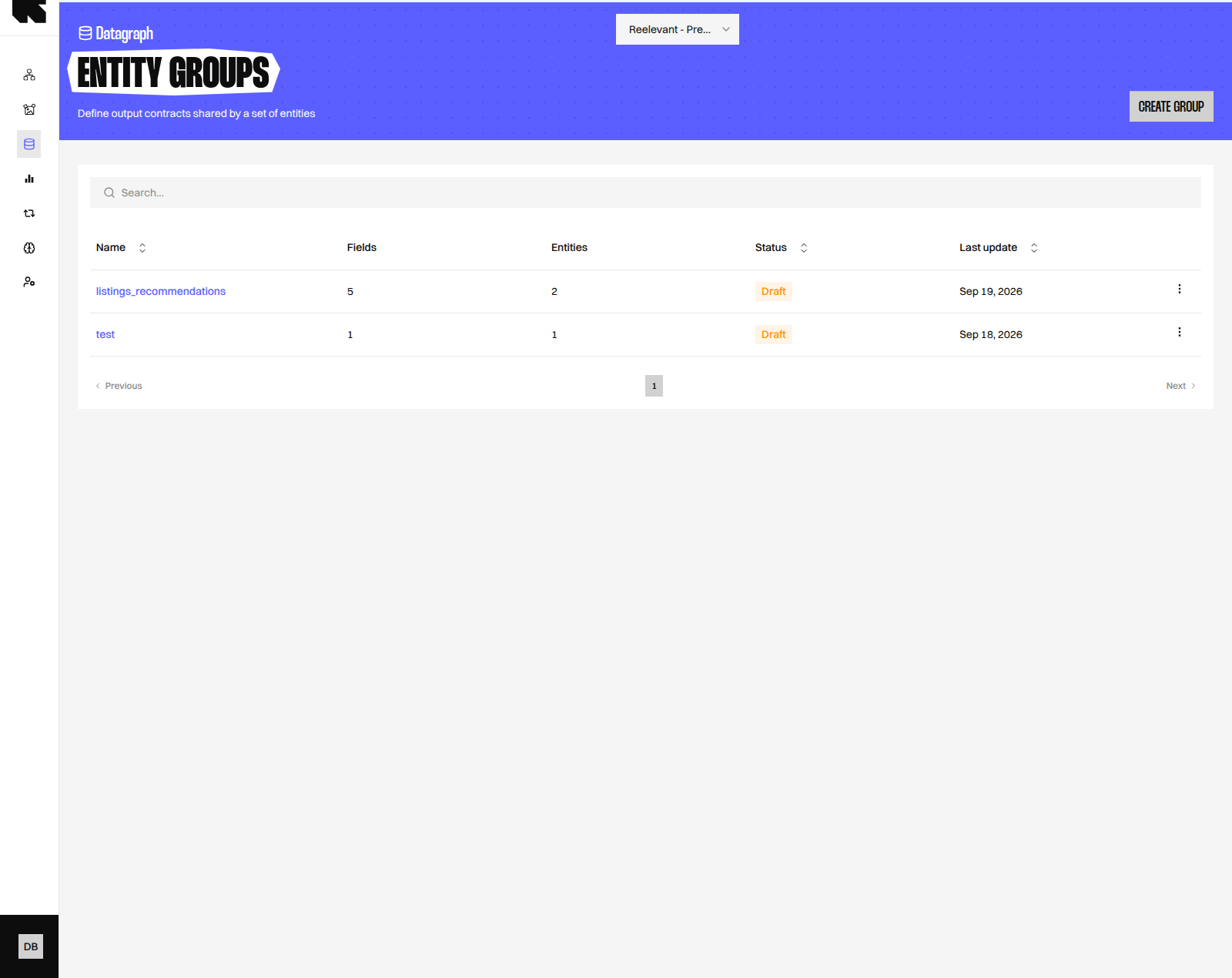
A [Datagraph Entity Group](/glossary) is an output contract shared by several Datagraph Entities. It lets several Entities — one per country, per brand, or per recommendation algorithm — be interchangeable for the consumer that reads them. Open **DataHub → Datagraph → Entity groups** — *Define output contracts shared by a set of entities*.
The listing shows each group with its **Name**, the number of **Fields** in the contract, the number of member **Entities**, its **Status** (**Draft** or **Live**), and **Last update**, plus two actions: **Edit** and **Delete**. **Create group** opens the editor on a new Draft.
 ## Before You Begin
* The Entities you want to bind must exist and, to publish the group, must have a Live version. See [Datagraph Entities](/advanced-guide/datahub/datagraph/entities).
* Creating and editing groups requires the Datagraph Entity permission. See [Permissions](/product-guide/account/permissions).
## Editor Layout
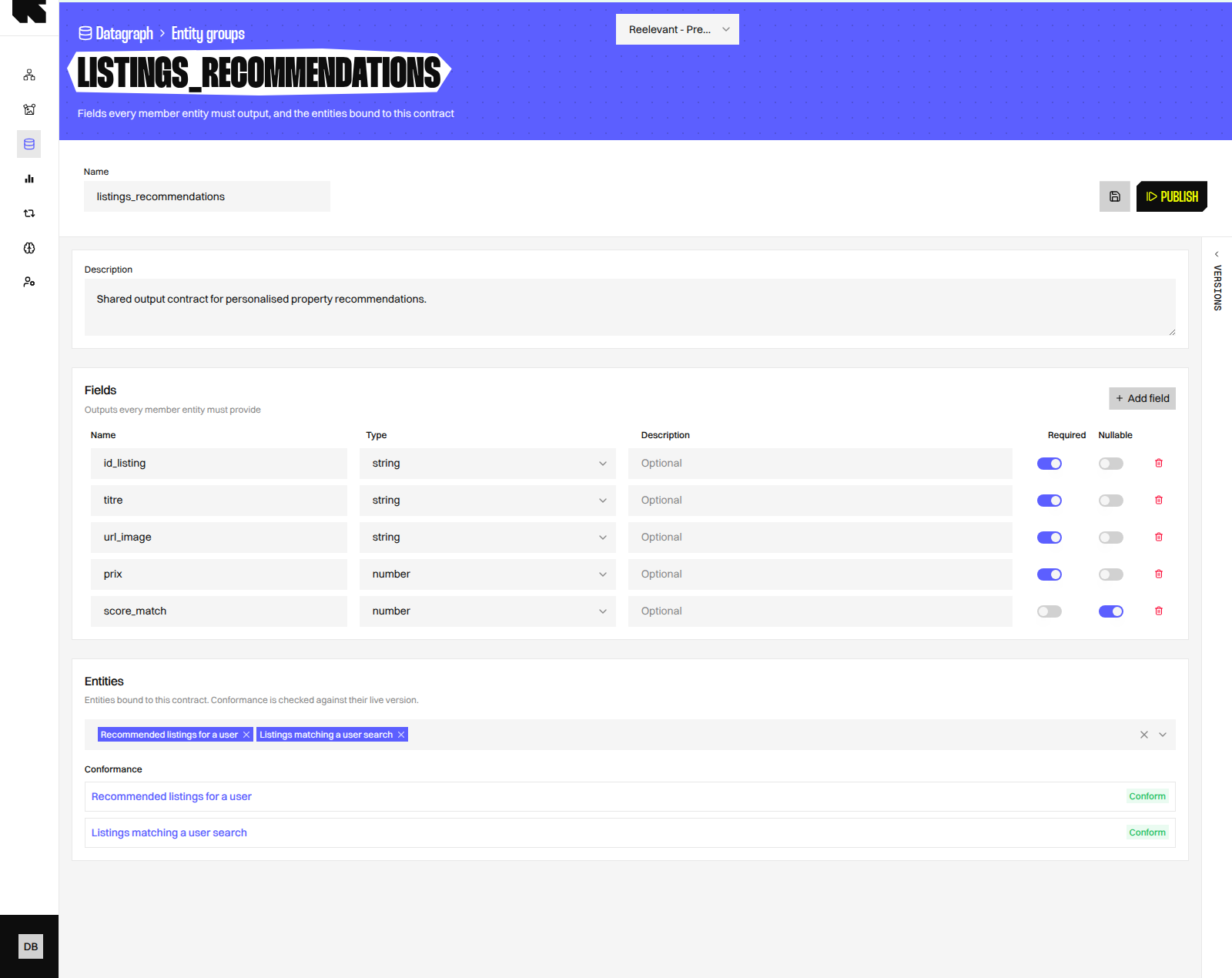
The toolbar holds the group **Name**, the **Save** action, the **Publish** action, and a **Versions** side panel, exactly as in the Entity editor.
| Field | Description |
| --------------- | ----------------------------------------------------------------------------- |
| **Name** | The group identifier. Use snake\_case, for example `product_recommendations`. |
| **Description** | Optional. What the group is for, in business terms. |
Below the toolbar, two sections define the contract and its members.
## Before You Begin
* The Entities you want to bind must exist and, to publish the group, must have a Live version. See [Datagraph Entities](/advanced-guide/datahub/datagraph/entities).
* Creating and editing groups requires the Datagraph Entity permission. See [Permissions](/product-guide/account/permissions).
## Editor Layout
The toolbar holds the group **Name**, the **Save** action, the **Publish** action, and a **Versions** side panel, exactly as in the Entity editor.
| Field | Description |
| --------------- | ----------------------------------------------------------------------------- |
| **Name** | The group identifier. Use snake\_case, for example `product_recommendations`. |
| **Description** | Optional. What the group is for, in business terms. |
Below the toolbar, two sections define the contract and its members.
 ### Fields
**Fields** lists the outputs every member Entity must provide. Click **Add field** to declare one.
| Column | Description |
| --------------- | -------------------------------------------------------------------------------------------------------------------------------------- |
| **Name** | The output column name the Entity must return, for example `product_id`. |
| **Type** | The expected type. It uses the same type list as Entity parameters, for example `string`, `number`, `boolean`, `datetime`, `string[]`. |
| **Description** | Optional. What the field contains. |
| **Required** | When enabled, an Entity that does not return this column violates the contract. When disabled, the column may be absent. |
| **Nullable** | Documents that the value can be empty for some rows. |
### Entities
**Entities** lists the Entities bound to this contract. Pick them in **Select entities...**; each member then shows its **Conformance**:
| Status | Meaning |
| ------------------- | ----------------------------------------------------------------------------------------------------------------------------------------------------------------------- |
| **Conform** | The Live version of the Entity returns every required field with a compatible type. |
| **No live version** | The Entity has never been published. The group can be saved but not published while it is a member. |
| **N violation(s)** | The Live version misses a required field, or returns it with an incompatible type. Each violation is listed under the Entity name, for example *Missing field "price"*. |
Conformance is checked against the Live version of each Entity, so an unpublished change to an Entity has no effect until it is published.
## Conformance Rules
* A required field must be present in the Entity output with a compatible type.
* An optional field may be absent. When present, its type must still be compatible.
* Two types are compatible when identical, or when they share the same primitive — `datetime` and `datetime_iso` both resolve to a date, for example.
* Extra output columns returned by an Entity are ignored.
The contract is enforced on both sides. Saving or publishing a group fails with *Entity group contract violated* when a member does not conform. Publishing an Entity fails with the same error when its new output would break a Live group it belongs to, and an Entity listed in a Live group cannot be deleted.
## Worked Example
The property listings model from [Datagraph Entities](/advanced-guide/datahub/datagraph/entities) has two Entities that return listings: `recommended_listings` and `listings_matching_search`. A Content that displays a listing card needs the same columns whichever Entity the Workflow selects.
| Field | Type | Required | Nullable |
| ------------- | -------- | -------- | -------- |
| `id_listing` | `string` | Yes | No |
| `titre` | `string` | Yes | No |
| `url_image` | `string` | Yes | No |
| `prix` | `number` | Yes | No |
| `score_match` | `number` | No | Yes |
Bind both Entities to a group named `listings_recommendations`. Each shows **Conform** when its Live SQL returns the four required columns, and the Workflow can switch Entities without changing the Content. The same pattern applies to one recommendation Entity per algorithm in a retail model.
## Saving and Publishing
**Save** validates the definition — a non-empty name, at least valid field names and types, and existing member Entities — then stores the Draft. *Unsaved changes* appears in the toolbar until you save.
Click **Publish** to promote the Draft to Live. The **Publish entity group** dialog accepts an optional **Commit message** describing the change. The previous Live version becomes Inactive, and a new Draft copy is created so editing can continue.
Publishing requires every member to be **Conform**; a member with **No live version** blocks the publication.
## Versions
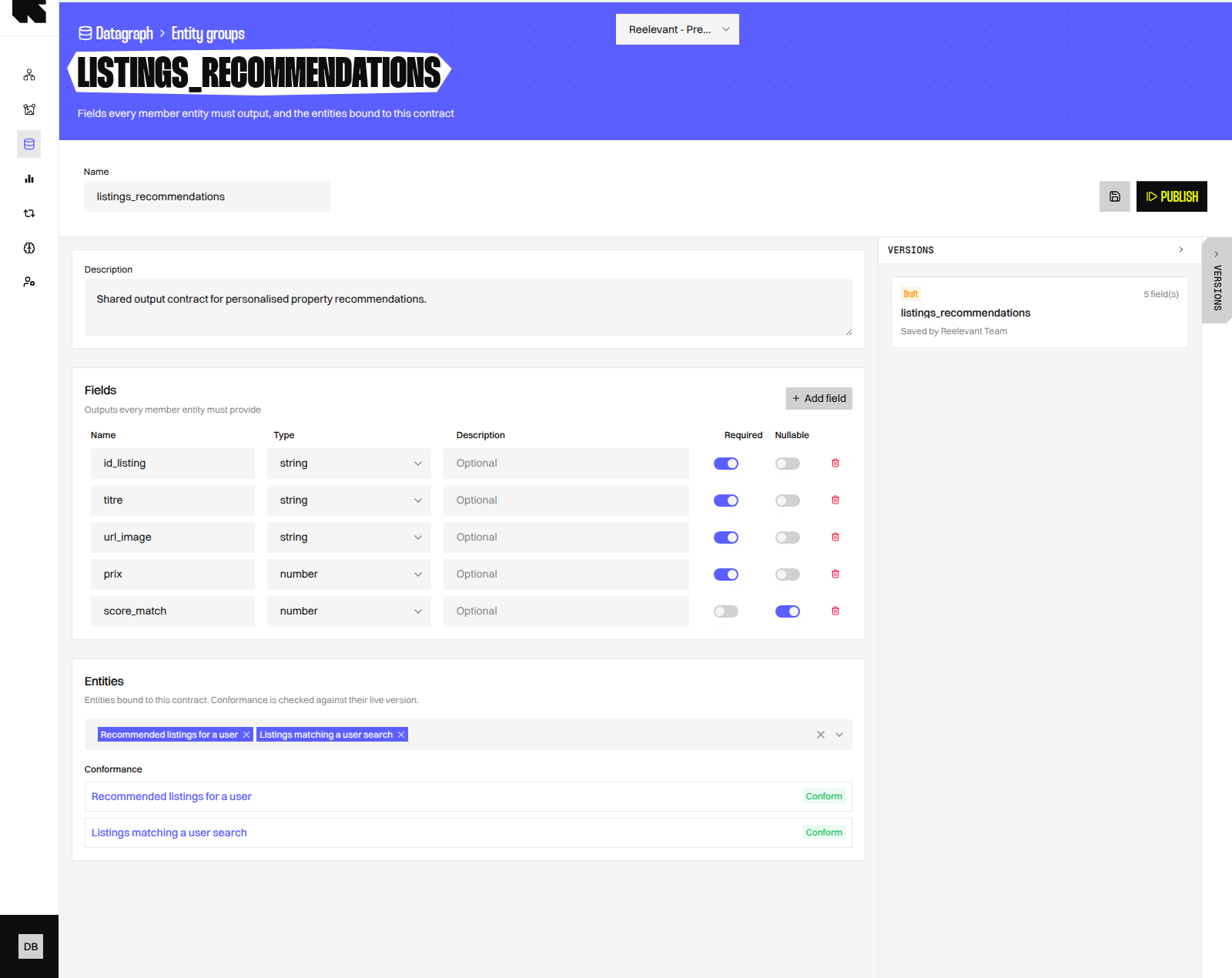
Open the **Versions** panel from the toolbar rail. Each card shows the version state, its field count, the author, and the commit message when one was provided. Click a card to load that definition into the editor — the editor asks for confirmation when you have unsaved changes. Save to make the loaded definition the new Draft.
### Fields
**Fields** lists the outputs every member Entity must provide. Click **Add field** to declare one.
| Column | Description |
| --------------- | -------------------------------------------------------------------------------------------------------------------------------------- |
| **Name** | The output column name the Entity must return, for example `product_id`. |
| **Type** | The expected type. It uses the same type list as Entity parameters, for example `string`, `number`, `boolean`, `datetime`, `string[]`. |
| **Description** | Optional. What the field contains. |
| **Required** | When enabled, an Entity that does not return this column violates the contract. When disabled, the column may be absent. |
| **Nullable** | Documents that the value can be empty for some rows. |
### Entities
**Entities** lists the Entities bound to this contract. Pick them in **Select entities...**; each member then shows its **Conformance**:
| Status | Meaning |
| ------------------- | ----------------------------------------------------------------------------------------------------------------------------------------------------------------------- |
| **Conform** | The Live version of the Entity returns every required field with a compatible type. |
| **No live version** | The Entity has never been published. The group can be saved but not published while it is a member. |
| **N violation(s)** | The Live version misses a required field, or returns it with an incompatible type. Each violation is listed under the Entity name, for example *Missing field "price"*. |
Conformance is checked against the Live version of each Entity, so an unpublished change to an Entity has no effect until it is published.
## Conformance Rules
* A required field must be present in the Entity output with a compatible type.
* An optional field may be absent. When present, its type must still be compatible.
* Two types are compatible when identical, or when they share the same primitive — `datetime` and `datetime_iso` both resolve to a date, for example.
* Extra output columns returned by an Entity are ignored.
The contract is enforced on both sides. Saving or publishing a group fails with *Entity group contract violated* when a member does not conform. Publishing an Entity fails with the same error when its new output would break a Live group it belongs to, and an Entity listed in a Live group cannot be deleted.
## Worked Example
The property listings model from [Datagraph Entities](/advanced-guide/datahub/datagraph/entities) has two Entities that return listings: `recommended_listings` and `listings_matching_search`. A Content that displays a listing card needs the same columns whichever Entity the Workflow selects.
| Field | Type | Required | Nullable |
| ------------- | -------- | -------- | -------- |
| `id_listing` | `string` | Yes | No |
| `titre` | `string` | Yes | No |
| `url_image` | `string` | Yes | No |
| `prix` | `number` | Yes | No |
| `score_match` | `number` | No | Yes |
Bind both Entities to a group named `listings_recommendations`. Each shows **Conform** when its Live SQL returns the four required columns, and the Workflow can switch Entities without changing the Content. The same pattern applies to one recommendation Entity per algorithm in a retail model.
## Saving and Publishing
**Save** validates the definition — a non-empty name, at least valid field names and types, and existing member Entities — then stores the Draft. *Unsaved changes* appears in the toolbar until you save.
Click **Publish** to promote the Draft to Live. The **Publish entity group** dialog accepts an optional **Commit message** describing the change. The previous Live version becomes Inactive, and a new Draft copy is created so editing can continue.
Publishing requires every member to be **Conform**; a member with **No live version** blocks the publication.
## Versions
Open the **Versions** panel from the toolbar rail. Each card shows the version state, its field count, the author, and the commit message when one was provided. Click a card to load that definition into the editor — the editor asks for confirmation when you have unsaved changes. Save to make the loaded definition the new Draft.
 ## Deleting a Group
**Delete** on the listing removes the group and all its versions. The dialog warns that *Contents bound to this group will stop resolving*; this cannot be undone. Member Entities are not deleted.
## What's Next?
Write the SQL and publish the Entities that join a group.
Add the columns and relations your SQL needs.
Consume a published Entity in a Workflow.
Grant the Datagraph Entity permission to your data team.
## Deleting a Group
**Delete** on the listing removes the group and all its versions. The dialog warns that *Contents bound to this group will stop resolving*; this cannot be undone. Member Entities are not deleted.
## What's Next?
Write the SQL and publish the Entities that join a group.
Add the columns and relations your SQL needs.
Consume a published Entity in a Workflow.
Grant the Datagraph Entity permission to your data team.