> ## Documentation Index
> Fetch the complete documentation index at: https://docs.reelevant.com/llms.txt
> Use this file to discover all available pages before exploring further.
# Queries
> Search, filter, and browse the data stored in your datasources
 ## Overview
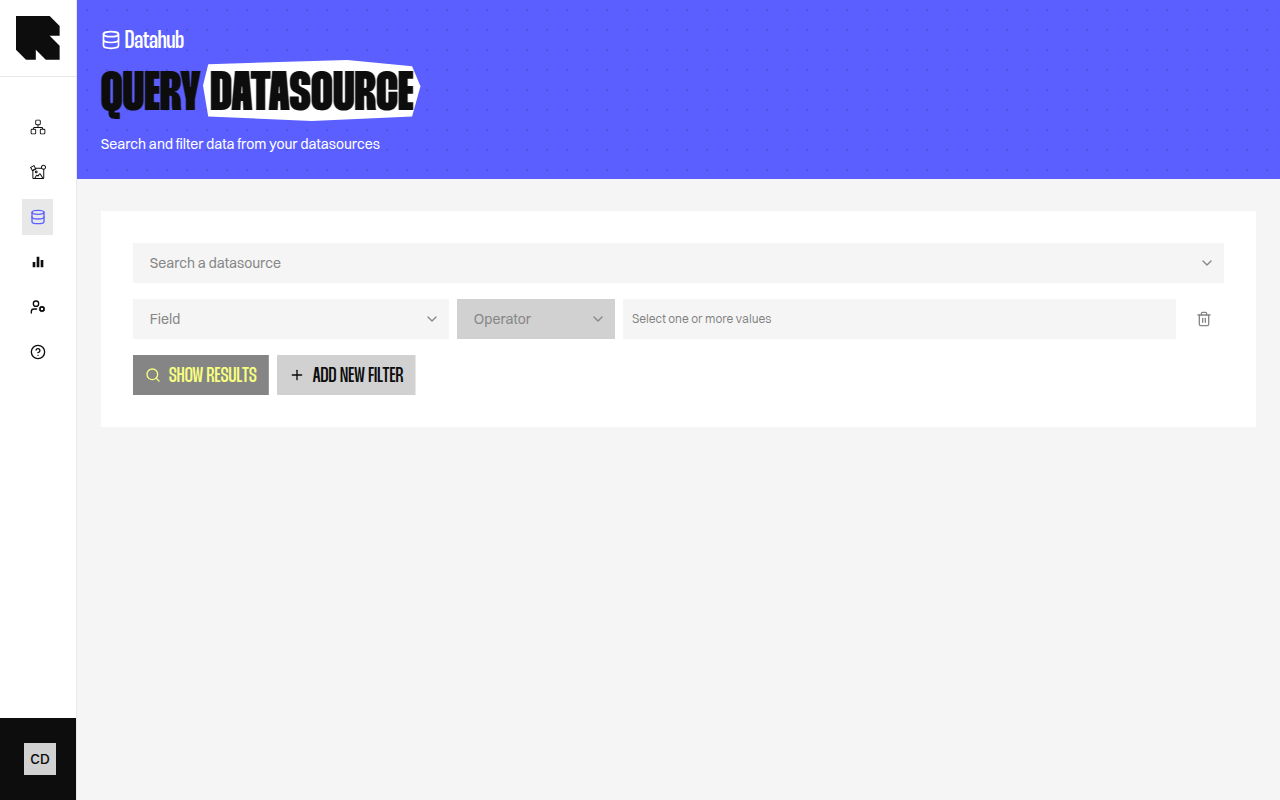
The Queries page lets you search and browse the data stored in a datasource. Use it to verify that your data was imported correctly, test filters, or explore specific records.
## Searching
Select a datasource from the dropdown to load its data. Use the search controls to find specific records:
| Control | Description |
| ----------------------- | -------------------------------------- |
| **Search a datasource** | Select the datasource to query. |
| **Show results** | Load the datasource data. |
| **Clear search** | Reset all filters and search criteria. |
## Filters
Click **Add new filter** to create filter rules:
| Field | Description |
| ------------ | ------------------------------------------------------ |
| **Criteria** | Select the field to filter on. |
| **Operator** | Choose a comparison operator (equals, contains, etc.). |
| **Value** | Enter the value to filter by. |
Multiple filters can be combined.
## Address Search
For **Location** datasources, an address search is available:
| Field | Description |
| ----------------- | ----------------------------------------------- |
| **Enter address** | Type an address to search for nearby locations. |
| **Distance** | The search radius. |
## Results
Results are displayed in a table view or a map view:
| Tab | Description |
| --------- | ------------------------------------------------------------------------------- |
| **Table** | A paginated table showing all matching records with their field values. |
| **Map** | A map view showing location-based results (available for location datasources). |
Results are limited to 1,000 records. If your datasource has more entries, use filters to narrow the results.
### Result Annotations
Some fields may have special annotations:
| Annotation | Description |
| --------------------- | -------------------------------------------------------------------- |
| **Transformed** | The field value has been transformed by Reelevant (e.g., geocoding). |
| **Renamed** | The field has been renamed from its original source name. |
| **Merge aggregation** | The field was added from a merged datasource. |
| **Count aggregation** | The field was computed by Reelevant (e.g., purchase count). |
## Editable Datasources
For **Editable datasource** types, the queries page includes additional controls:
| Action | Description |
| --------------- | ------------------------------------------------------ |
| **Add row** | Manually add a data row. |
| **Import file** | Upload a file to bulk-import data into the datasource. |
The import file flow includes three steps: upload, verify data, and send. You can toggle **Reset data** to replace all existing data.
## Overview
The Queries page lets you search and browse the data stored in a datasource. Use it to verify that your data was imported correctly, test filters, or explore specific records.
## Searching
Select a datasource from the dropdown to load its data. Use the search controls to find specific records:
| Control | Description |
| ----------------------- | -------------------------------------- |
| **Search a datasource** | Select the datasource to query. |
| **Show results** | Load the datasource data. |
| **Clear search** | Reset all filters and search criteria. |
## Filters
Click **Add new filter** to create filter rules:
| Field | Description |
| ------------ | ------------------------------------------------------ |
| **Criteria** | Select the field to filter on. |
| **Operator** | Choose a comparison operator (equals, contains, etc.). |
| **Value** | Enter the value to filter by. |
Multiple filters can be combined.
## Address Search
For **Location** datasources, an address search is available:
| Field | Description |
| ----------------- | ----------------------------------------------- |
| **Enter address** | Type an address to search for nearby locations. |
| **Distance** | The search radius. |
## Results
Results are displayed in a table view or a map view:
| Tab | Description |
| --------- | ------------------------------------------------------------------------------- |
| **Table** | A paginated table showing all matching records with their field values. |
| **Map** | A map view showing location-based results (available for location datasources). |
Results are limited to 1,000 records. If your datasource has more entries, use filters to narrow the results.
### Result Annotations
Some fields may have special annotations:
| Annotation | Description |
| --------------------- | -------------------------------------------------------------------- |
| **Transformed** | The field value has been transformed by Reelevant (e.g., geocoding). |
| **Renamed** | The field has been renamed from its original source name. |
| **Merge aggregation** | The field was added from a merged datasource. |
| **Count aggregation** | The field was computed by Reelevant (e.g., purchase count). |
## Editable Datasources
For **Editable datasource** types, the queries page includes additional controls:
| Action | Description |
| --------------- | ------------------------------------------------------ |
| **Add row** | Manually add a data row. |
| **Import file** | Upload a file to bulk-import data into the datasource. |
The import file flow includes three steps: upload, verify data, and send. You can toggle **Reset data** to replace all existing data.