> ## Documentation Index
> Fetch the complete documentation index at: https://docs.reelevant.com/llms.txt
> Use this file to discover all available pages before exploring further.
# Countdown Component
> Add animated countdown timers to a target date in your content templates
 ## Overview
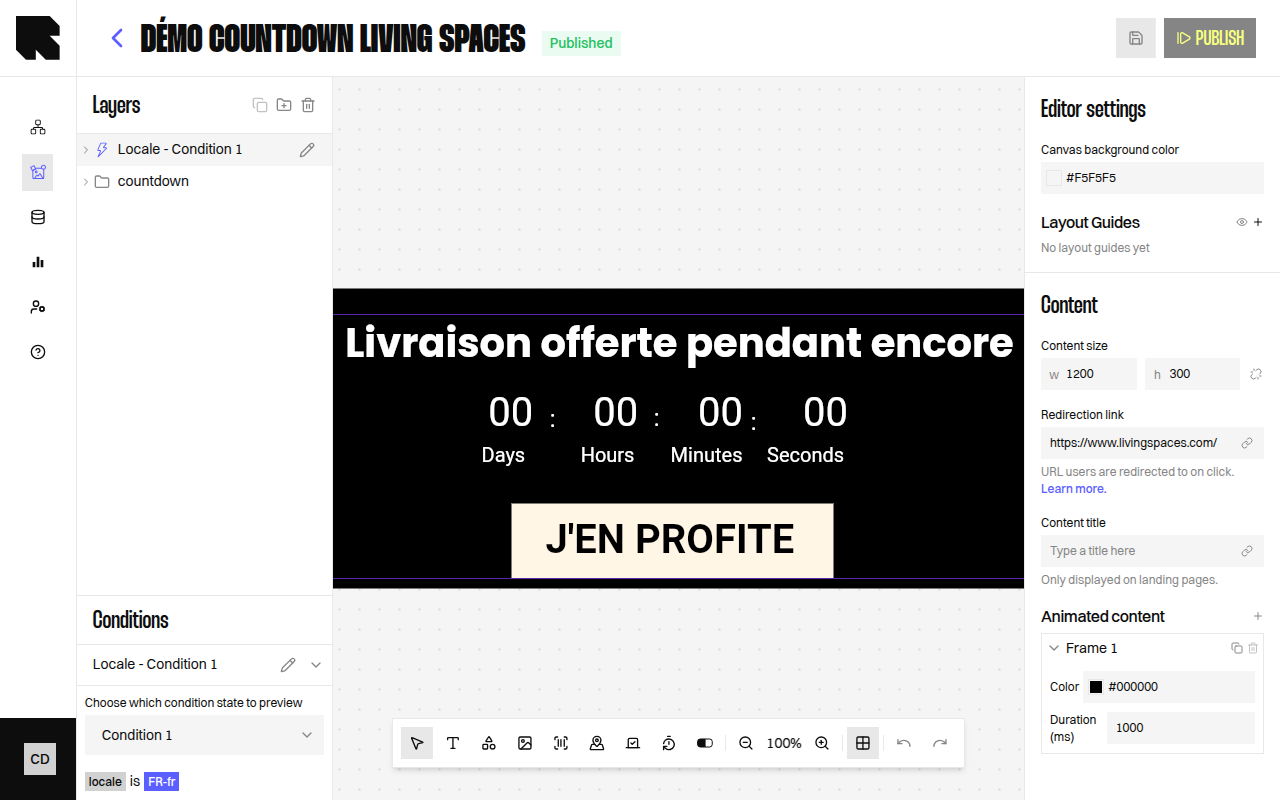
The Countdown component displays a live countdown timer that counts down to a target date. It is ideal for limited-time promotions, event launches, and flash sales.
| Property | Value |
| ------------------------- | ----------------- |
| **Toolbar button** | Countdown |
| **Supports data binding** | Yes — target date |
| **Supports conditions** | Yes |
## Countdown Parameters
| Property | Description |
| ----------------------------- | -------------------------------------------------------------------------------------------- |
| **Fixed date** | The target date and time for the countdown. Can be static or bound to a datasource variable. |
| **Space between numbers** | Horizontal spacing between the digit groups. |
| **Use user's local timezone** | When enabled, the countdown end date adjusts to each viewer's local timezone. |
## Local Timezone
Enable **Use user's local timezone** to adjust the countdown end date for each viewer automatically.
Without this option, a countdown set to "15 Jan at 18:00 UTC" ends at 19:00 for a user in Paris (UTC+1) and at 03:00 the next morning in Tokyo (UTC+9). With the option enabled, the countdown ends at 18:00 local time for everyone — so both the French and Japanese users see it expire at 6pm in their own timezone.
This is ideal for multi-country campaigns where a promotion must end at the same local time in every country.
Some email clients pre-fetch or cache images. That can freeze the countdown at fetch time. See [Email client caching and proxies](/advanced-guide/email-rendering/caching-and-proxies).
## Digit Configuration
Each time unit (Days, Hours, Minutes, Seconds) has independent configuration:
| Property | Description |
| ------------------------- | ---------------------------------------- |
| **Show digits** | Toggle to show or hide this digit group. |
| **Padding around digits** | Add padding around the digit display. |
## Styling
The countdown inherits text styling from the [Text component](/product-guide/contents/components/text) — font family, size, weight, color, and alignment can all be customized.
## Overview
The Countdown component displays a live countdown timer that counts down to a target date. It is ideal for limited-time promotions, event launches, and flash sales.
| Property | Value |
| ------------------------- | ----------------- |
| **Toolbar button** | Countdown |
| **Supports data binding** | Yes — target date |
| **Supports conditions** | Yes |
## Countdown Parameters
| Property | Description |
| ----------------------------- | -------------------------------------------------------------------------------------------- |
| **Fixed date** | The target date and time for the countdown. Can be static or bound to a datasource variable. |
| **Space between numbers** | Horizontal spacing between the digit groups. |
| **Use user's local timezone** | When enabled, the countdown end date adjusts to each viewer's local timezone. |
## Local Timezone
Enable **Use user's local timezone** to adjust the countdown end date for each viewer automatically.
Without this option, a countdown set to "15 Jan at 18:00 UTC" ends at 19:00 for a user in Paris (UTC+1) and at 03:00 the next morning in Tokyo (UTC+9). With the option enabled, the countdown ends at 18:00 local time for everyone — so both the French and Japanese users see it expire at 6pm in their own timezone.
This is ideal for multi-country campaigns where a promotion must end at the same local time in every country.
Some email clients pre-fetch or cache images. That can freeze the countdown at fetch time. See [Email client caching and proxies](/advanced-guide/email-rendering/caching-and-proxies).
## Digit Configuration
Each time unit (Days, Hours, Minutes, Seconds) has independent configuration:
| Property | Description |
| ------------------------- | ---------------------------------------- |
| **Show digits** | Toggle to show or hide this digit group. |
| **Padding around digits** | Add padding around the digit display. |
## Styling
The countdown inherits text styling from the [Text component](/product-guide/contents/components/text) — font family, size, weight, color, and alignment can all be customized.