> ## Documentation Index
> Fetch the complete documentation index at: https://docs.reelevant.com/llms.txt
> Use this file to discover all available pages before exploring further.
# Text Component
> Add and configure rich text elements with dynamic variables and transformations
 ## Overview
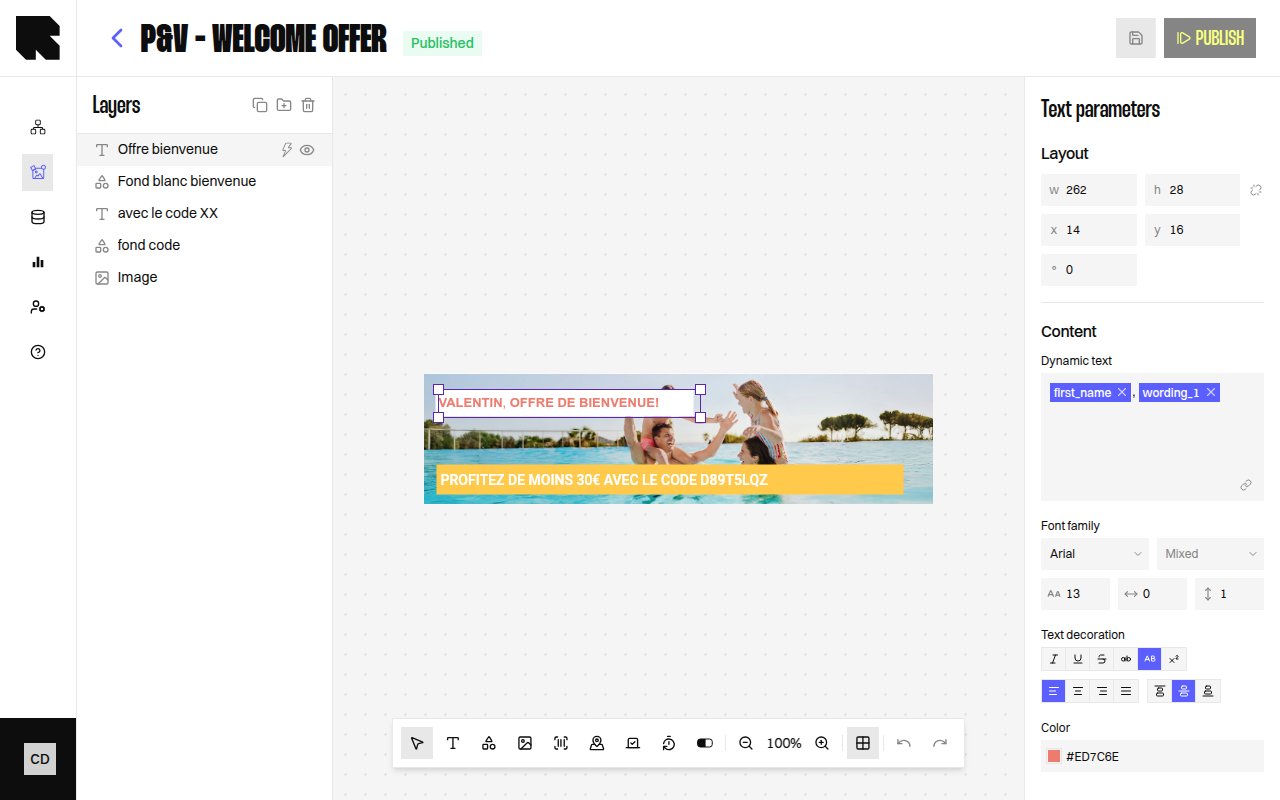
The Text component lets you add rich text to your content templates. Text can be static or **dynamic** — bound to variables from [datasources](/product-guide/contents/data-binding) that resolve at render time.
| Property | Value |
| ------------------------- | ------------------------------------ |
| **Toolbar button** | Text |
| **Supports data binding** | Yes — text content, redirection link |
| **Supports conditions** | Yes |
## Text Parameters
When a Text component is selected, the configuration panel shows:
| Property | Description |
| ---------------- | ------------------------------------------------------------ |
| **Content** | The text content. Type directly or use the rich text editor. |
| **Dynamic text** | Toggle to bind the text content to a datasource variable. |
## Style
The text style section provides full typographic control:
| Property | Options |
| ------------------- | ------------------------------------------------------------------------------------------------------- |
| **Font family** | Select from available fonts (including custom fonts from [Settings](/product-guide/contents/settings)). |
| **Font weight** | Thin, Extra light, Light, Regular, Medium, Semi bold, Bold, Extra bold, Black, Extra black. |
| **Size** | Font size in pixels. |
| **Letter spacing** | Space between characters. |
| **Line height** | Vertical spacing between lines. |
| **Color** | Text fill color. |
| **Text decoration** | Uppercase, Lowercase, Underline, Crossed (strikethrough), Superscript, Italic. |
| **Alignment** | Left, Center, Right, Justify (horizontal). Top, Middle, Bottom (vertical). |
When text has mixed styles (e.g., part bold, part regular), the style fields show **Mixed** and apply changes only to the selected portion.
## Transformations
When a text field is bound to a datasource variable, you can apply **transformations** to format the value before rendering:
| Category | Examples |
| --------------- | ------------------------------------------------------------- |
| **Date & time** | Date, Date text, Hour, Day, Month's name, etc. |
| **Number** | Round, Absolute, Negative, Percentage, Round up to N decimal. |
| **Currency** | Format with currency symbol, rounding options. |
Transformations require selecting a **Language** and optionally a **Currency** for locale-aware formatting.
## Redirection
| Property | Description |
| -------------------- | ----------------------------------------------------------------------------------- |
| **Redirection link** | URL users are redirected to on click. Can be a static URL or a datasource variable. |
If a content is used in a [workflow](/product-guide/workflows/overview) that requires a redirection link, you must define one — otherwise publishing will show an error.
## Overview
The Text component lets you add rich text to your content templates. Text can be static or **dynamic** — bound to variables from [datasources](/product-guide/contents/data-binding) that resolve at render time.
| Property | Value |
| ------------------------- | ------------------------------------ |
| **Toolbar button** | Text |
| **Supports data binding** | Yes — text content, redirection link |
| **Supports conditions** | Yes |
## Text Parameters
When a Text component is selected, the configuration panel shows:
| Property | Description |
| ---------------- | ------------------------------------------------------------ |
| **Content** | The text content. Type directly or use the rich text editor. |
| **Dynamic text** | Toggle to bind the text content to a datasource variable. |
## Style
The text style section provides full typographic control:
| Property | Options |
| ------------------- | ------------------------------------------------------------------------------------------------------- |
| **Font family** | Select from available fonts (including custom fonts from [Settings](/product-guide/contents/settings)). |
| **Font weight** | Thin, Extra light, Light, Regular, Medium, Semi bold, Bold, Extra bold, Black, Extra black. |
| **Size** | Font size in pixels. |
| **Letter spacing** | Space between characters. |
| **Line height** | Vertical spacing between lines. |
| **Color** | Text fill color. |
| **Text decoration** | Uppercase, Lowercase, Underline, Crossed (strikethrough), Superscript, Italic. |
| **Alignment** | Left, Center, Right, Justify (horizontal). Top, Middle, Bottom (vertical). |
When text has mixed styles (e.g., part bold, part regular), the style fields show **Mixed** and apply changes only to the selected portion.
## Transformations
When a text field is bound to a datasource variable, you can apply **transformations** to format the value before rendering:
| Category | Examples |
| --------------- | ------------------------------------------------------------- |
| **Date & time** | Date, Date text, Hour, Day, Month's name, etc. |
| **Number** | Round, Absolute, Negative, Percentage, Round up to N decimal. |
| **Currency** | Format with currency symbol, rounding options. |
Transformations require selecting a **Language** and optionally a **Currency** for locale-aware formatting.
## Redirection
| Property | Description |
| -------------------- | ----------------------------------------------------------------------------------- |
| **Redirection link** | URL users are redirected to on click. Can be a static URL or a datasource variable. |
If a content is used in a [workflow](/product-guide/workflows/overview) that requires a redirection link, you must define one — otherwise publishing will show an error.