> ## Documentation Index
> Fetch the complete documentation index at: https://docs.reelevant.com/llms.txt
> Use this file to discover all available pages before exploring further.
# Catalog
> Browse available datasource types and connect new data sources to your account
 ## Overview
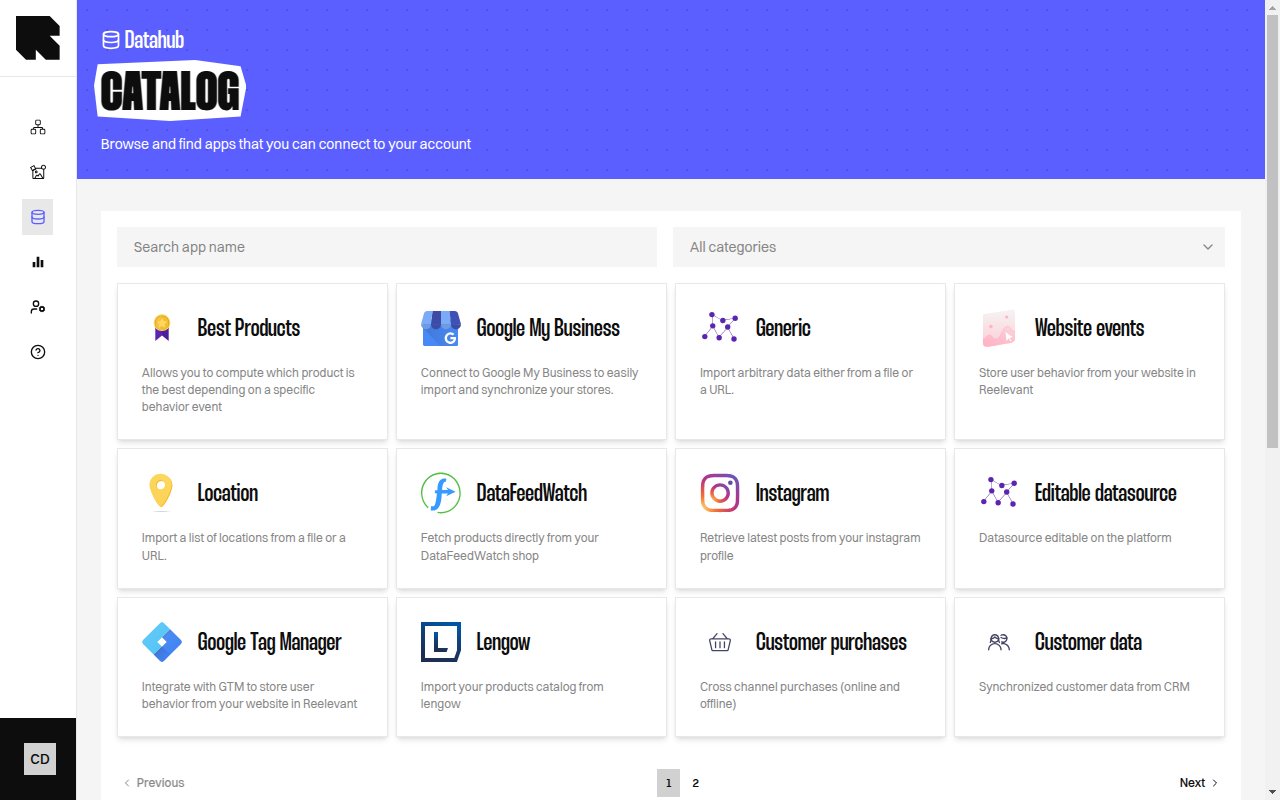
The Catalog is the starting point for adding new datasources. It presents a gallery of available integrations organized by category. Each card shows a brief description of the integration and a **Connect** button to begin the setup wizard.
## Browsing the Catalog
Use the controls at the top of the catalog to find the integration you need:
| Control | Description |
| ------------------- | ----------------------------------------------------------------------------------- |
| **Category filter** | Filter by category — All categories, Product, Location, Generic, Analytics, Social. |
| **Search** | Search by app name to quickly find a specific integration. |
## Available Integrations
### Product
| Integration | Description |
| ------------------------------------- | ------------------------------------------------------------------------- |
| **Product** | Import your product data from a file or a URL. |
| **Shopify Products** | Connect to your Shopify and retrieve all products. |
| **Best Products** | Compute which product is the best depending on a specific behavior event. |
| **Cross sell** | Compute a cross sell based on bought-together strategy. |
| **Top product attributes** | Compute the top brand/categories for each user. |
| **Multi-country product datasources** | Create one datasource with one product feed for each country. |
| **Lengow** | Import your products catalog from Lengow. |
| **DataFeedWatch** | Fetch products directly from your DataFeedWatch shop. |
| **Merge two datasources** | Add data from another datasource into product data. |
### Location
| Integration | Description |
| ---------------------- | -------------------------------------------------------------------- |
| **Location** | Import a list of locations from a file or a URL. |
| **Google My Business** | Connect to Google My Business to import and synchronize your stores. |
| **Partoo** | Import and synchronize stores from your Partoo account. |
### Generic
| Integration | Description |
| ----------------------- | ---------------------------------------------------- |
| **Generic** | Import arbitrary data either from a file or a URL. |
| **BigQuery** | Synchronize data from BigQuery table into Reelevant. |
| **Snowflake** | Synchronize tables from Snowflake into Reelevant. |
| **Google Sheets** | Import data from a public Google Sheet. |
| **Editable datasource** | Datasource editable directly on the platform. |
### Analytics
| Integration | Description |
| -------------------------- | ------------------------------------------------------------ |
| **Website events** | Store user behavior from your website in Reelevant. |
| **Google Tag Manager** | Integrate with GTM to store user behavior from your website. |
| **Shopify Website Events** | Connect website events from your Shopify shop directly. |
| **Customer purchases** | Cross channel purchases (online and offline). |
| **Customer data** | Synchronized customer data from CRM. |
Some integrations may not be available depending on your subscription plan. Contact your Customer Success Manager to access more integrations.
## Connecting a Datasource
Click **Connect** on any catalog card to start the [creation wizard](/product-guide/datahub/creating-a-datasource). The wizard guides you through source configuration, field mapping, and validation.
## Overview
The Catalog is the starting point for adding new datasources. It presents a gallery of available integrations organized by category. Each card shows a brief description of the integration and a **Connect** button to begin the setup wizard.
## Browsing the Catalog
Use the controls at the top of the catalog to find the integration you need:
| Control | Description |
| ------------------- | ----------------------------------------------------------------------------------- |
| **Category filter** | Filter by category — All categories, Product, Location, Generic, Analytics, Social. |
| **Search** | Search by app name to quickly find a specific integration. |
## Available Integrations
### Product
| Integration | Description |
| ------------------------------------- | ------------------------------------------------------------------------- |
| **Product** | Import your product data from a file or a URL. |
| **Shopify Products** | Connect to your Shopify and retrieve all products. |
| **Best Products** | Compute which product is the best depending on a specific behavior event. |
| **Cross sell** | Compute a cross sell based on bought-together strategy. |
| **Top product attributes** | Compute the top brand/categories for each user. |
| **Multi-country product datasources** | Create one datasource with one product feed for each country. |
| **Lengow** | Import your products catalog from Lengow. |
| **DataFeedWatch** | Fetch products directly from your DataFeedWatch shop. |
| **Merge two datasources** | Add data from another datasource into product data. |
### Location
| Integration | Description |
| ---------------------- | -------------------------------------------------------------------- |
| **Location** | Import a list of locations from a file or a URL. |
| **Google My Business** | Connect to Google My Business to import and synchronize your stores. |
| **Partoo** | Import and synchronize stores from your Partoo account. |
### Generic
| Integration | Description |
| ----------------------- | ---------------------------------------------------- |
| **Generic** | Import arbitrary data either from a file or a URL. |
| **BigQuery** | Synchronize data from BigQuery table into Reelevant. |
| **Snowflake** | Synchronize tables from Snowflake into Reelevant. |
| **Google Sheets** | Import data from a public Google Sheet. |
| **Editable datasource** | Datasource editable directly on the platform. |
### Analytics
| Integration | Description |
| -------------------------- | ------------------------------------------------------------ |
| **Website events** | Store user behavior from your website in Reelevant. |
| **Google Tag Manager** | Integrate with GTM to store user behavior from your website. |
| **Shopify Website Events** | Connect website events from your Shopify shop directly. |
| **Customer purchases** | Cross channel purchases (online and offline). |
| **Customer data** | Synchronized customer data from CRM. |
Some integrations may not be available depending on your subscription plan. Contact your Customer Success Manager to access more integrations.
## Connecting a Datasource
Click **Connect** on any catalog card to start the [creation wizard](/product-guide/datahub/creating-a-datasource). The wizard guides you through source configuration, field mapping, and validation.