> ## Documentation Index
> Fetch the complete documentation index at: https://docs.reelevant.com/llms.txt
> Use this file to discover all available pages before exploring further.
# Datasource Listing
> Browse, search, and manage all your saved datasources
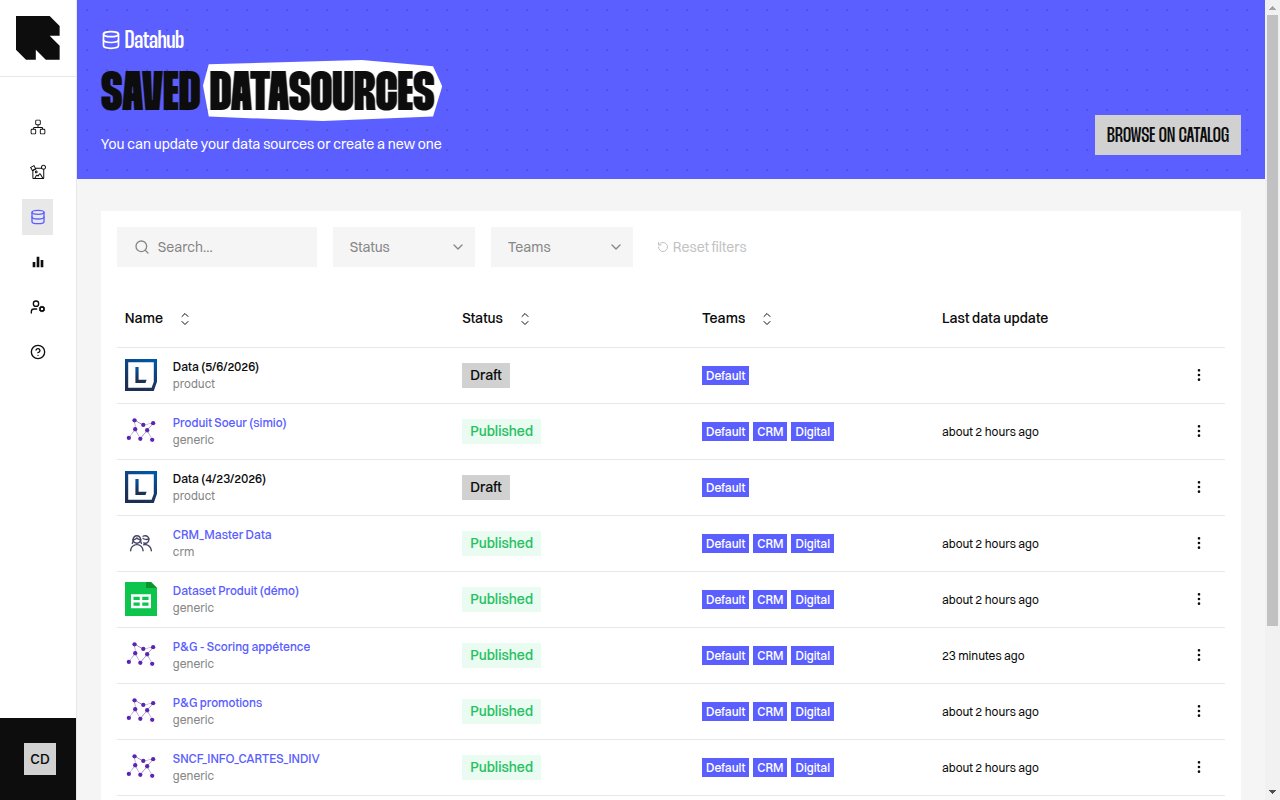 ## Datasource Listing
The listing page displays all your saved datasources in a table. Access it from the **DataHub** sidebar navigation.
### Table Columns
| Column | Description |
| --------------------- | ------------------------------------------------------------------------------- |
| **Name** | The datasource name. Click to open its configuration. |
| **Type** | The datasource category — Generic, Product, Location, Analytics, Customer Data. |
| **Status** | Current status with a color indicator and tooltip. |
| **Format** | The data format (CSV, JSON, etc.). |
| **Teams** | The teams assigned to the datasource. |
| **Last data update** | When the data was last refreshed. |
| **Last modification** | When the configuration was last changed. |
### Filters
| Filter | Description |
| --------------------------------- | ----------------------------------------------------- |
| **Search** | Search a datasource by name. |
| **Filter by status** | Ok, Warning, Error, Inactive. |
| **Filter by type** | Generic, Product, Location, Analytics, Customer Data. |
| **Filter by teams** | Filter by team. |
| **Display archived data sources** | Toggle to include archived datasources. |
The hierarchy breadcrumbs let you navigate through folder levels.
## Status Indicators
| Status | Description |
| -------------- | -------------------------------------------------------------------------------------- |
| **Draft** | The datasource has not yet been imported. |
| **Publishing** | Importing data for the first time. |
| **Published** | Data is up to date and ready to use. |
| **Updating** | Datasource is currently refreshing its data. |
| **Paused** | Data refresh is paused. |
| **Error** | Import or update failed — consult the [logs](/advanced-guide/datahub/logs). |
| **Warning** | Some entries could not be imported — consult the [logs](/advanced-guide/datahub/logs). |
Hover over a status indicator to see a detailed tooltip explaining the current state.
## Actions
The actions menu (three dots) on each row provides:
| Action | Description |
| ------------------------------------------------- | ------------------------------------------------------------------------------------------------------------------------------------------------------- |
| **Edit** | Open the configuration wizard to modify the datasource. |
| **Queries** | Open the [queries page](/advanced-guide/datahub/queries) to search the datasource data. |
| **Logs** | Open the [logs page](/advanced-guide/datahub/logs) to see execution history. |
| **Preview** | Quick preview of the datasource data. |
| **Update fields** | Update the field mapping configuration. |
| **Update source** | Change the data source URL or file. |
| **Launch update** | Manually trigger a data refresh. |
| **Reimport** | Re-import the datasource from scratch. |
| **Retry** | Retry a failed import. |
| **Repair** | Attempt to repair a broken datasource. |
| **Enable synchronisation / Stop synchronisation** | Enable or pause automatic data refresh. |
| **Archive** | Archive the datasource. |
| **Delete** | Delete the datasource (only available if not used by any [workflow](/product-guide/workflows/overview) or [content](/product-guide/contents/overview)). |
You cannot delete a datasource that is used in a workflow or content. The delete action will show which resources reference it.
## Error Alerts
When datasources have issues, alert banners appear at the top of the listing:
* **Datasources in error** — Shows how many datasources failed with a link to view the errors.
* **Missing fields** — Detected fields that are not present in the datasource, with a quick action to add them.
## Datasource Listing
The listing page displays all your saved datasources in a table. Access it from the **DataHub** sidebar navigation.
### Table Columns
| Column | Description |
| --------------------- | ------------------------------------------------------------------------------- |
| **Name** | The datasource name. Click to open its configuration. |
| **Type** | The datasource category — Generic, Product, Location, Analytics, Customer Data. |
| **Status** | Current status with a color indicator and tooltip. |
| **Format** | The data format (CSV, JSON, etc.). |
| **Teams** | The teams assigned to the datasource. |
| **Last data update** | When the data was last refreshed. |
| **Last modification** | When the configuration was last changed. |
### Filters
| Filter | Description |
| --------------------------------- | ----------------------------------------------------- |
| **Search** | Search a datasource by name. |
| **Filter by status** | Ok, Warning, Error, Inactive. |
| **Filter by type** | Generic, Product, Location, Analytics, Customer Data. |
| **Filter by teams** | Filter by team. |
| **Display archived data sources** | Toggle to include archived datasources. |
The hierarchy breadcrumbs let you navigate through folder levels.
## Status Indicators
| Status | Description |
| -------------- | -------------------------------------------------------------------------------------- |
| **Draft** | The datasource has not yet been imported. |
| **Publishing** | Importing data for the first time. |
| **Published** | Data is up to date and ready to use. |
| **Updating** | Datasource is currently refreshing its data. |
| **Paused** | Data refresh is paused. |
| **Error** | Import or update failed — consult the [logs](/advanced-guide/datahub/logs). |
| **Warning** | Some entries could not be imported — consult the [logs](/advanced-guide/datahub/logs). |
Hover over a status indicator to see a detailed tooltip explaining the current state.
## Actions
The actions menu (three dots) on each row provides:
| Action | Description |
| ------------------------------------------------- | ------------------------------------------------------------------------------------------------------------------------------------------------------- |
| **Edit** | Open the configuration wizard to modify the datasource. |
| **Queries** | Open the [queries page](/advanced-guide/datahub/queries) to search the datasource data. |
| **Logs** | Open the [logs page](/advanced-guide/datahub/logs) to see execution history. |
| **Preview** | Quick preview of the datasource data. |
| **Update fields** | Update the field mapping configuration. |
| **Update source** | Change the data source URL or file. |
| **Launch update** | Manually trigger a data refresh. |
| **Reimport** | Re-import the datasource from scratch. |
| **Retry** | Retry a failed import. |
| **Repair** | Attempt to repair a broken datasource. |
| **Enable synchronisation / Stop synchronisation** | Enable or pause automatic data refresh. |
| **Archive** | Archive the datasource. |
| **Delete** | Delete the datasource (only available if not used by any [workflow](/product-guide/workflows/overview) or [content](/product-guide/contents/overview)). |
You cannot delete a datasource that is used in a workflow or content. The delete action will show which resources reference it.
## Error Alerts
When datasources have issues, alert banners appear at the top of the listing:
* **Datasources in error** — Shows how many datasources failed with a link to view the errors.
* **Missing fields** — Detected fields that are not present in the datasource, with a quick action to add them.