> ## Documentation Index
> Fetch the complete documentation index at: https://docs.reelevant.com/llms.txt
> Use this file to discover all available pages before exploring further.
# DataHub Overview
> Import, configure, and manage your data sources to power personalized content
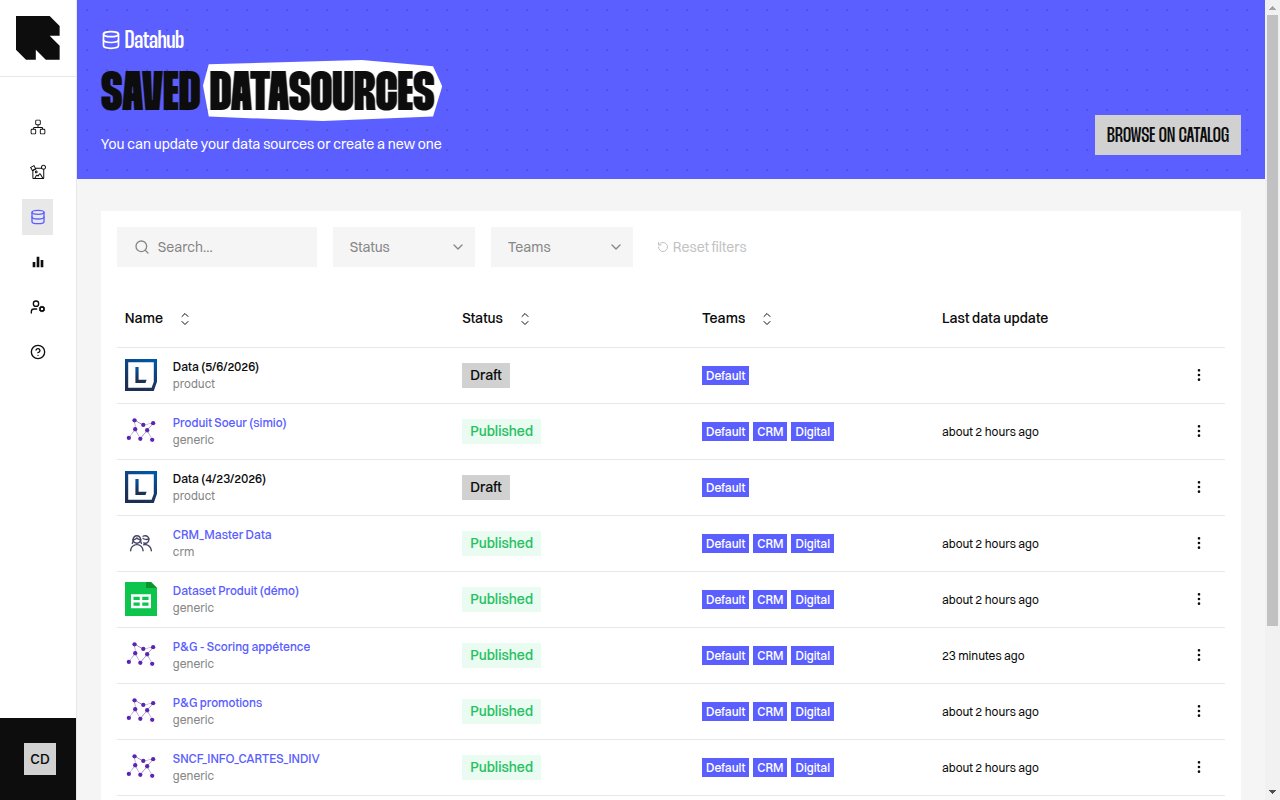 ## What is the DataHub?
The DataHub is the Reelevant platform's data management center. It lets you import, configure, and maintain external data feeds — product catalogs, store locations, CRM records, website events, and more — so they can be used in [workflows](/product-guide/workflows/overview) and [content templates](/product-guide/contents/overview) to personalize every experience.
## Key Concepts
| Concept | Description |
| ----------------- | --------------------------------------------------------------------------------------------------------------------------- |
| **Datasource** | A connection to an external data feed that Reelevant fetches, parses, and stores for use in personalization. |
| **Catalog** | A gallery of available datasource types (Product, Location, Generic, Analytics, etc.) you can connect. |
| **Source** | The origin of the data — a URL, uploaded file, FTP/SFTP server, BigQuery, Snowflake, GCS, S3, Kafka, or another datasource. |
| **Field mapping** | The configuration that maps raw data fields to standardized types (reference ID, price, URL, etc.). |
| **Queries** | A tool for searching and browsing the data stored in a datasource. |
| **Logs** | Execution history showing fetch, parse, and save operations with status and error details. |
## Datasource Types
The DataHub supports several datasource categories:
| Category | Description |
| ----------------- | ----------------------------------------------------------------------- |
| **Product** | Product catalogs with fields like reference ID, name, price, image URL. |
| **Location** | Store or point-of-interest listings with address and coordinates. |
| **Generic** | Arbitrary data feeds for any use case. |
| **Analytics** | Website event tracking (page views, clicks, purchases). |
| **Customer Data** | CRM data synchronized from external systems. |
## Datasource Lifecycle
| Status | Description |
| -------------- | ------------------------------------------------------------ |
| **Draft** | The datasource has been created but not yet imported. |
| **Publishing** | The datasource is being processed for the first time. |
| **Published** | The datasource is live and its data is available for use. |
| **Updating** | The datasource is refreshing with new data. |
| **Paused** | Data refresh has been paused. |
| **Error** | The datasource encountered an issue during import or update. |
## What's Next?
Browse available datasource types and connect new sources.
Step-by-step guide to creating your first datasource.
Manage your saved datasources.
Learn about each data source connector.
Configure how raw fields map to Reelevant types.
Search and browse your datasource data.
## What is the DataHub?
The DataHub is the Reelevant platform's data management center. It lets you import, configure, and maintain external data feeds — product catalogs, store locations, CRM records, website events, and more — so they can be used in [workflows](/product-guide/workflows/overview) and [content templates](/product-guide/contents/overview) to personalize every experience.
## Key Concepts
| Concept | Description |
| ----------------- | --------------------------------------------------------------------------------------------------------------------------- |
| **Datasource** | A connection to an external data feed that Reelevant fetches, parses, and stores for use in personalization. |
| **Catalog** | A gallery of available datasource types (Product, Location, Generic, Analytics, etc.) you can connect. |
| **Source** | The origin of the data — a URL, uploaded file, FTP/SFTP server, BigQuery, Snowflake, GCS, S3, Kafka, or another datasource. |
| **Field mapping** | The configuration that maps raw data fields to standardized types (reference ID, price, URL, etc.). |
| **Queries** | A tool for searching and browsing the data stored in a datasource. |
| **Logs** | Execution history showing fetch, parse, and save operations with status and error details. |
## Datasource Types
The DataHub supports several datasource categories:
| Category | Description |
| ----------------- | ----------------------------------------------------------------------- |
| **Product** | Product catalogs with fields like reference ID, name, price, image URL. |
| **Location** | Store or point-of-interest listings with address and coordinates. |
| **Generic** | Arbitrary data feeds for any use case. |
| **Analytics** | Website event tracking (page views, clicks, purchases). |
| **Customer Data** | CRM data synchronized from external systems. |
## Datasource Lifecycle
| Status | Description |
| -------------- | ------------------------------------------------------------ |
| **Draft** | The datasource has been created but not yet imported. |
| **Publishing** | The datasource is being processed for the first time. |
| **Published** | The datasource is live and its data is available for use. |
| **Updating** | The datasource is refreshing with new data. |
| **Paused** | Data refresh has been paused. |
| **Error** | The datasource encountered an issue during import or update. |
## What's Next?
Browse available datasource types and connect new sources.
Step-by-step guide to creating your first datasource.
Manage your saved datasources.
Learn about each data source connector.
Configure how raw fields map to Reelevant types.
Search and browse your datasource data.