> ## Documentation Index
> Fetch the complete documentation index at: https://docs.reelevant.com/llms.txt
> Use this file to discover all available pages before exploring further.
# Datasource Nodes
> Connect to data imported in DataHub with generic, product, and location datasources
 ## Overview
Datasource nodes connect to data you've imported in [DataHub](/product-guide/datahub/overview). There are three specialized types, each optimized for a specific data category.
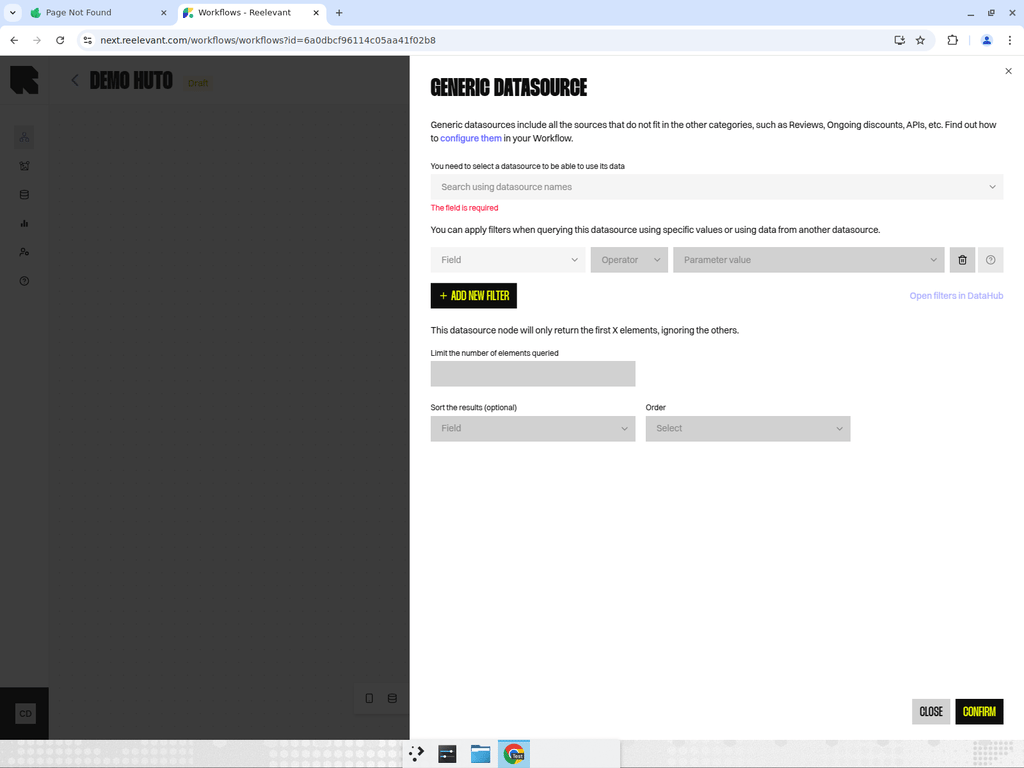
## Generic Datasource
For data that doesn't fit product or location categories — reviews, promotions, API feeds, CRM data, etc.
**Configuration:**
* **Select a datasource** — Search and pick from your imported datasources.
* **Filters** — Apply rules to narrow down results. Filters can use static values or reference data from other nodes in the workflow.
* **Ordering** — Customize result order: keep default, change every 10 seconds for everyone, or change for each person.
* **Location data** — Optionally include location data if your datasource contains geographic information.
## Product Datasource
Designed specifically for product catalog data. Includes additional features for product-specific use cases.
**Configuration:**
* All the same options as Generic Datasource, plus:
* **Combinatorial products** — Enable to create product combinations.
* **Group results by** — Group products by a field (e.g., brand, category) with output modes:
* Aggregated data
* First product of every group
* All products of the first group
* All products of all groups
## Location Datasource
For store locator and location-based personalization. Finds locations near a given point.
**Configuration:**
* **Address** — The reference address to search from (can be static or dynamic from another node).
* **Distance (km)** — Maximum radius to search within.
* **Filters** — Additional filtering rules.
Combine a Location Datasource with a [Geolocation](/product-guide/workflows/data-nodes/geolocation) node to automatically find stores near the user's current position.
## Overview
Datasource nodes connect to data you've imported in [DataHub](/product-guide/datahub/overview). There are three specialized types, each optimized for a specific data category.
## Generic Datasource
For data that doesn't fit product or location categories — reviews, promotions, API feeds, CRM data, etc.
**Configuration:**
* **Select a datasource** — Search and pick from your imported datasources.
* **Filters** — Apply rules to narrow down results. Filters can use static values or reference data from other nodes in the workflow.
* **Ordering** — Customize result order: keep default, change every 10 seconds for everyone, or change for each person.
* **Location data** — Optionally include location data if your datasource contains geographic information.
## Product Datasource
Designed specifically for product catalog data. Includes additional features for product-specific use cases.
**Configuration:**
* All the same options as Generic Datasource, plus:
* **Combinatorial products** — Enable to create product combinations.
* **Group results by** — Group products by a field (e.g., brand, category) with output modes:
* Aggregated data
* First product of every group
* All products of the first group
* All products of all groups
## Location Datasource
For store locator and location-based personalization. Finds locations near a given point.
**Configuration:**
* **Address** — The reference address to search from (can be static or dynamic from another node).
* **Distance (km)** — Maximum radius to search within.
* **Filters** — Additional filtering rules.
Combine a Location Datasource with a [Geolocation](/product-guide/workflows/data-nodes/geolocation) node to automatically find stores near the user's current position.