> ## Documentation Index
> Fetch the complete documentation index at: https://docs.reelevant.com/llms.txt
> Use this file to discover all available pages before exploring further.
# URL Parameter
> Capture values passed via the URL when the workflow is executed
 ## Overview
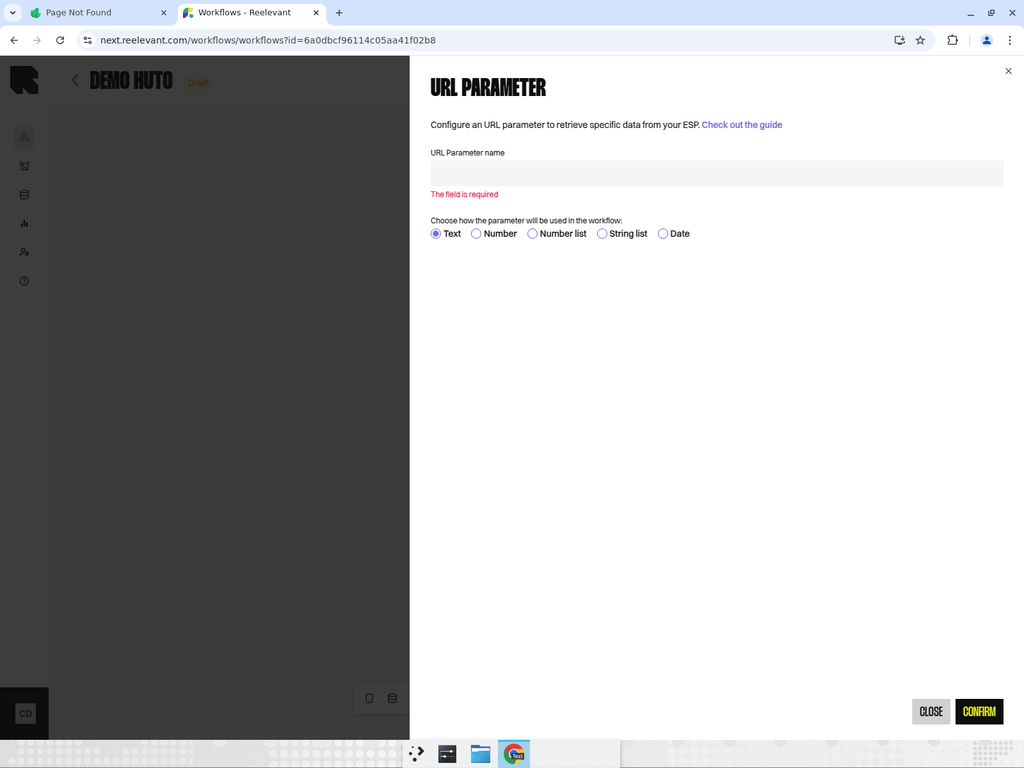
The URL Parameter node captures a value passed via the URL when the workflow is executed. This is useful for passing context from your ESP (email service provider), website, or any integration that triggers the workflow via URL.
**Configuration:**
* **Parameter name** — The URL query parameter to read (e.g., `product_id`, `campaign_date`).
* **Date format** — If the parameter contains a date, specify the expected format for proper parsing.
## Common Use Cases
* Pass **user IDs** from your email service provider to personalize content per recipient.
* Pass **campaign identifiers** to customize content based on the campaign context.
* Pass **product IDs** or **category names** from your website to show relevant recommendations.
URL parameters are commonly used to pass user IDs, campaign identifiers, or contextual data from your marketing tools into Reelevant workflows. Learn more about configuring them during [Integration](/product-guide/workflows/integration).
## Best Practices
* Use [Variable profiles](/product-guide/workflows/settings) to pre-configure URL parameter templates for different integrations.
* Always document the expected parameter names and formats in your workflow description.
* Consider using a date format when passing dates to ensure proper parsing across locales.
## Overview
The URL Parameter node captures a value passed via the URL when the workflow is executed. This is useful for passing context from your ESP (email service provider), website, or any integration that triggers the workflow via URL.
**Configuration:**
* **Parameter name** — The URL query parameter to read (e.g., `product_id`, `campaign_date`).
* **Date format** — If the parameter contains a date, specify the expected format for proper parsing.
## Common Use Cases
* Pass **user IDs** from your email service provider to personalize content per recipient.
* Pass **campaign identifiers** to customize content based on the campaign context.
* Pass **product IDs** or **category names** from your website to show relevant recommendations.
URL parameters are commonly used to pass user IDs, campaign identifiers, or contextual data from your marketing tools into Reelevant workflows. Learn more about configuring them during [Integration](/product-guide/workflows/integration).
## Best Practices
* Use [Variable profiles](/product-guide/workflows/settings) to pre-configure URL parameter templates for different integrations.
* Always document the expected parameter names and formats in your workflow description.
* Consider using a date format when passing dates to ensure proper parsing across locales.