> ## Documentation Index
> Fetch the complete documentation index at: https://docs.reelevant.com/llms.txt
> Use this file to discover all available pages before exploring further.
# Overview
> Control the flow of your workflow with conditions, splits, and real-time testing
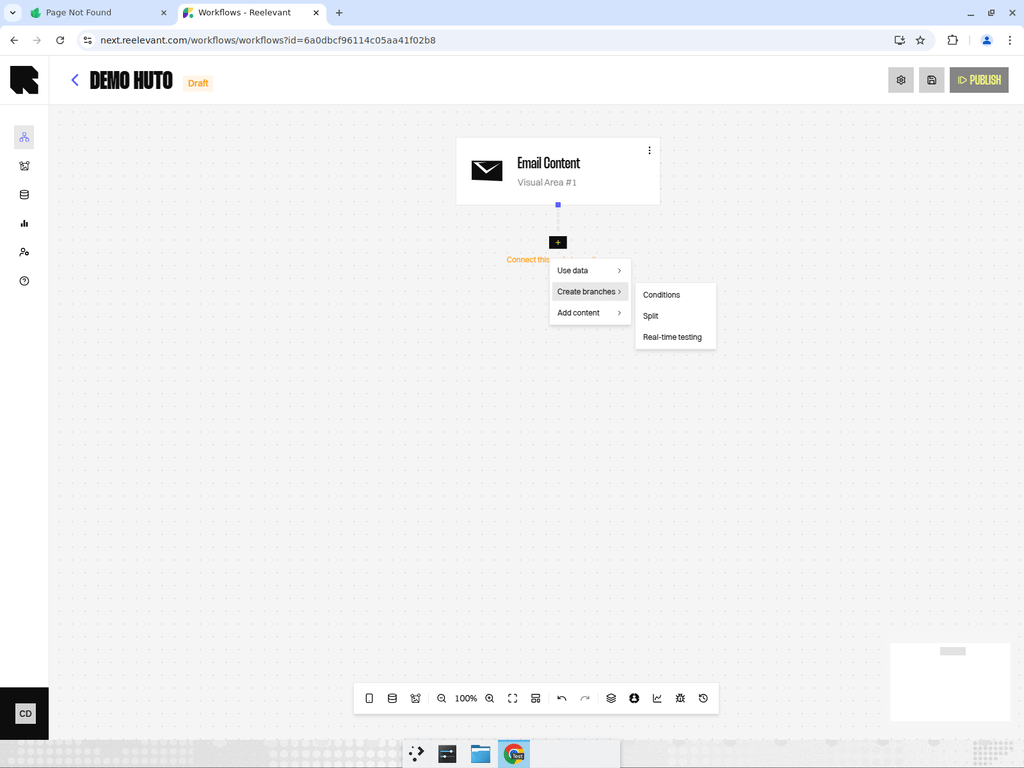 ## What are Logic Nodes?
Logic nodes control **which path** a user follows through the workflow. They create branches based on conditions, random splits, or real-time testing rules. This is how you deliver different experiences to different audience segments.
## Logic Node Types
Evaluate rules to decide which branch a user takes.
Divide traffic into branches based on population share percentages.
Automated traffic distribution that optimizes over time.
## Creating Branches
When you add a logic node, it automatically creates output branches. You can:
1. **Add more branches** by clicking "Add" in the condition or split configuration.
2. **Qualify branches** by right-clicking on an edge and selecting "Qualify branch" to assign a [branch category](/product-guide/workflows/branches).
3. **Name branches** to make the workflow easier to understand.
## Best Practices
* **Keep conditions simple** — Complex nested conditions are harder to debug. Use multiple condition nodes in sequence instead.
* **Always have a default branch** — Ensure every user gets a response, even if they don't match any condition.
* **Use splits for testing** — Run A/B tests with split nodes before committing to a single personalization strategy.
* **Document your logic** — Use the right-click context menu to add documentation notes to complex logic nodes.
## What are Logic Nodes?
Logic nodes control **which path** a user follows through the workflow. They create branches based on conditions, random splits, or real-time testing rules. This is how you deliver different experiences to different audience segments.
## Logic Node Types
Evaluate rules to decide which branch a user takes.
Divide traffic into branches based on population share percentages.
Automated traffic distribution that optimizes over time.
## Creating Branches
When you add a logic node, it automatically creates output branches. You can:
1. **Add more branches** by clicking "Add" in the condition or split configuration.
2. **Qualify branches** by right-clicking on an edge and selecting "Qualify branch" to assign a [branch category](/product-guide/workflows/branches).
3. **Name branches** to make the workflow easier to understand.
## Best Practices
* **Keep conditions simple** — Complex nested conditions are harder to debug. Use multiple condition nodes in sequence instead.
* **Always have a default branch** — Ensure every user gets a response, even if they don't match any condition.
* **Use splits for testing** — Run A/B tests with split nodes before committing to a single personalization strategy.
* **Document your logic** — Use the right-click context menu to add documentation notes to complex logic nodes.