> ## Documentation Index
> Fetch the complete documentation index at: https://docs.reelevant.com/llms.txt
> Use this file to discover all available pages before exploring further.
# Conditions
> Evaluate rules to decide which branch a user takes in the workflow
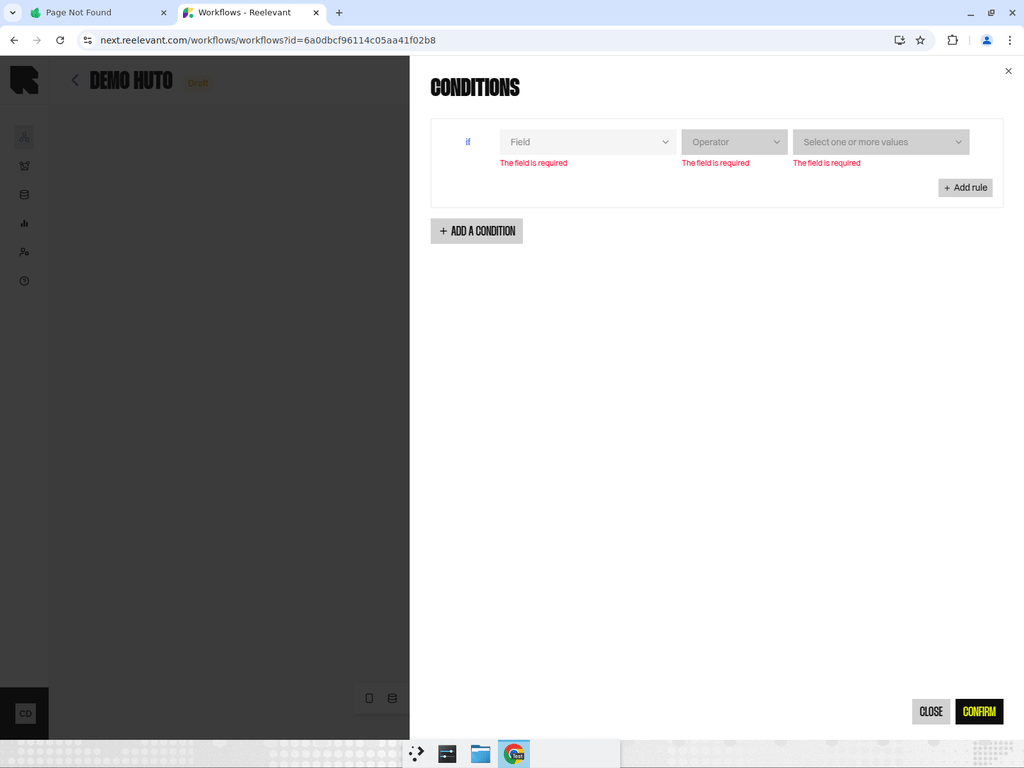 ## Overview
Condition nodes evaluate rules to decide which branch a user takes. They are the most common way to create personalized paths in a workflow.
## How It Works
* A condition node has **two output branches** — one for users who match the conditions and one for users who do not.
* You define a set of **rules** that must be satisfied for a user to follow the matching branch.
* Rules can reference data from upstream Data Nodes, context variables, or URL parameters.
* Rules are combined with either **AND** (all must match) or **OR** (any must match) logic.
* If no condition is met, the user follows the non-matching branch.
## Configuration
1. Click on a condition node to open its configuration drawer.
2. Define conditions for each branch — each condition consists of a field, operator, and value.
3. The default branch catches all users who don't match any condition.
You can use condition nodes to create audience segments — for example, routing VIP customers to a premium content branch while showing a generic offer to everyone else.
## Operators
Conditions support various operators depending on the field type:
* **Text** — equals, not equals, contains, not contains, is empty, is not empty
* **Numbers** — equals, not equals, greater than, less than, less than or equal, greater than or equal
* **Dates** — equals, not equals, before, after, is empty, is not empty, in future range, in past range
* **Booleans** — equals
* **Arrays** — contains, not contains
## Best Practices
* Keep each condition node focused on a single decision point.
* Use descriptive names for branches so the workflow is self-documenting.
* Place the most specific conditions first — they are evaluated in order.
* Always verify that the default branch provides a meaningful fallback experience.
## Overview
Condition nodes evaluate rules to decide which branch a user takes. They are the most common way to create personalized paths in a workflow.
## How It Works
* A condition node has **two output branches** — one for users who match the conditions and one for users who do not.
* You define a set of **rules** that must be satisfied for a user to follow the matching branch.
* Rules can reference data from upstream Data Nodes, context variables, or URL parameters.
* Rules are combined with either **AND** (all must match) or **OR** (any must match) logic.
* If no condition is met, the user follows the non-matching branch.
## Configuration
1. Click on a condition node to open its configuration drawer.
2. Define conditions for each branch — each condition consists of a field, operator, and value.
3. The default branch catches all users who don't match any condition.
You can use condition nodes to create audience segments — for example, routing VIP customers to a premium content branch while showing a generic offer to everyone else.
## Operators
Conditions support various operators depending on the field type:
* **Text** — equals, not equals, contains, not contains, is empty, is not empty
* **Numbers** — equals, not equals, greater than, less than, less than or equal, greater than or equal
* **Dates** — equals, not equals, before, after, is empty, is not empty, in future range, in past range
* **Booleans** — equals
* **Arrays** — contains, not contains
## Best Practices
* Keep each condition node focused on a single decision point.
* Use descriptive names for branches so the workflow is self-documenting.
* Place the most specific conditions first — they are evaluated in order.
* Always verify that the default branch provides a meaningful fallback experience.