> ## Documentation Index
> Fetch the complete documentation index at: https://docs.reelevant.com/llms.txt
> Use this file to discover all available pages before exploring further.
# Overview
> Define what gets returned at the end of a workflow branch
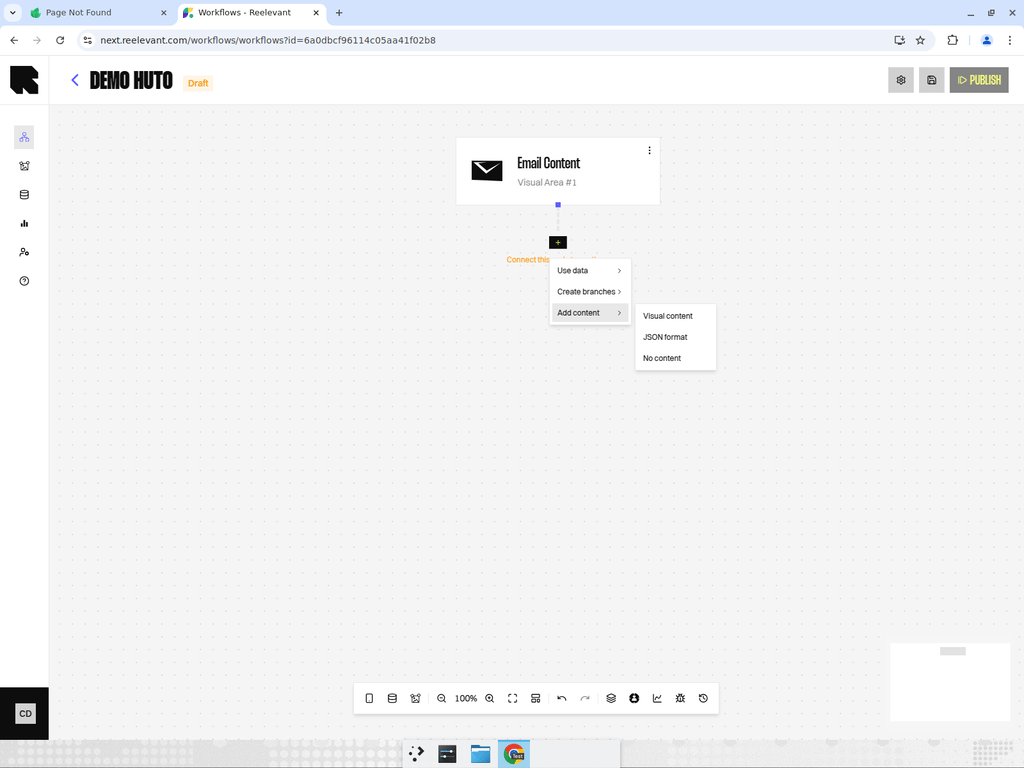 ## What are Output Nodes?
Output nodes are the **terminal nodes** of a workflow branch. Every branch that starts from a [channel](/product-guide/workflows/channels) must end with an output node that defines what content is returned to the user.
## Output Node Types
Render a visual template designed in the Content Editor.
Return a structured JSON payload using a pre-defined template with dynamic variables.
Return an empty response for control groups or fallbacks.
## Adding an Output Node
Click the **Output** button (content icon) in the bottom toolbar. The **Content types** drawer opens.
Choose **Visual content**, **JSON template**, or **Empty** from the available options.
Connect the output node to the end of a branch. If you chose Visual content, select the content template from the content library.
## Tips
* Every branch must end with an output node for the workflow to be valid and publishable.
* A single workflow can mix different output types across its branches — for example, Content on the main branch and Empty on the control group.
* When selecting a content template, make sure the data available in the branch matches the template's dynamic variables.
## What are Output Nodes?
Output nodes are the **terminal nodes** of a workflow branch. Every branch that starts from a [channel](/product-guide/workflows/channels) must end with an output node that defines what content is returned to the user.
## Output Node Types
Render a visual template designed in the Content Editor.
Return a structured JSON payload using a pre-defined template with dynamic variables.
Return an empty response for control groups or fallbacks.
## Adding an Output Node
Click the **Output** button (content icon) in the bottom toolbar. The **Content types** drawer opens.
Choose **Visual content**, **JSON template**, or **Empty** from the available options.
Connect the output node to the end of a branch. If you chose Visual content, select the content template from the content library.
## Tips
* Every branch must end with an output node for the workflow to be valid and publishable.
* A single workflow can mix different output types across its branches — for example, Content on the main branch and Empty on the control group.
* When selecting a content template, make sure the data available in the branch matches the template's dynamic variables.