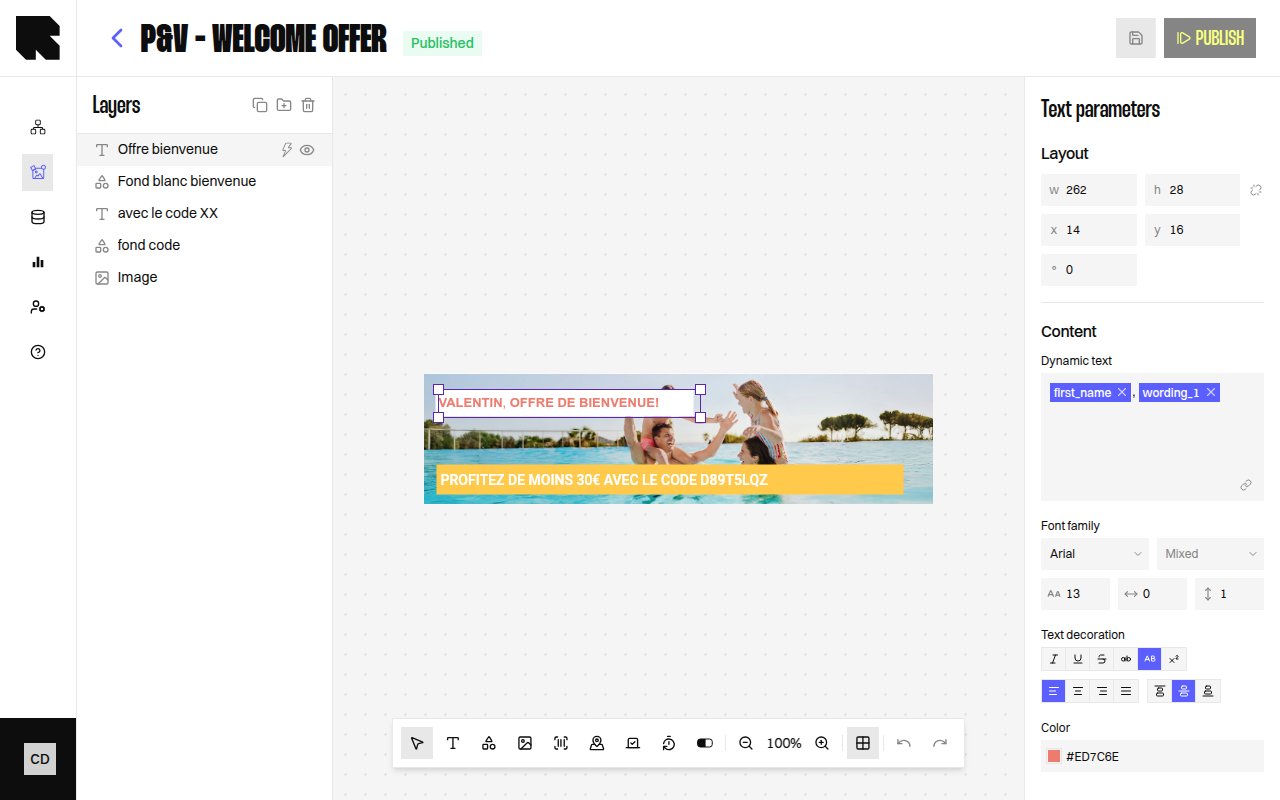
Text component selected on the canvas with configuration panel open

Overview

The Text component lets you add rich text to your content templates. Text can be static or dynamic — bound to variables from datasources that resolve at render time.
PropertyValue
Toolbar buttonText
Supports data bindingYes — text content, redirection link
Supports conditionsYes

Text Parameters

When a Text component is selected, the configuration panel shows:
PropertyDescription
ContentThe text content. Type directly or use the rich text editor.
Dynamic textToggle to bind the text content to a datasource variable.

Style

The text style section provides full typographic control:
PropertyOptions
Font familySelect from available fonts (including custom fonts from Settings).
Font weightThin, Extra light, Light, Regular, Medium, Semi bold, Bold, Extra bold, Black, Extra black.
SizeFont size in pixels.
Letter spacingSpace between characters.
Line heightVertical spacing between lines.
ColorText fill color.
Text decorationUppercase, Lowercase, Underline, Crossed (strikethrough), Superscript, Italic.
AlignmentLeft, Center, Right, Justify (horizontal). Top, Middle, Bottom (vertical).
When text has mixed styles (e.g., part bold, part regular), the style fields show Mixed and apply changes only to the selected portion.

Transformations

When a text field is bound to a datasource variable, you can apply transformations to format the value before rendering:
CategoryExamples
Date & timeDate, Date text, Hour, Day, Month’s name, etc.
NumberRound, Absolute, Negative, Percentage, Round up to N decimal.
CurrencyFormat with currency symbol, rounding options.
Transformations require selecting a Language and optionally a Currency for locale-aware formatting.

Redirection

PropertyDescription
Redirection linkURL users are redirected to on click. Can be a static URL or a datasource variable.
If a content is used in a workflow that requires a redirection link, you must define one — otherwise publishing will show an error.