

Overview
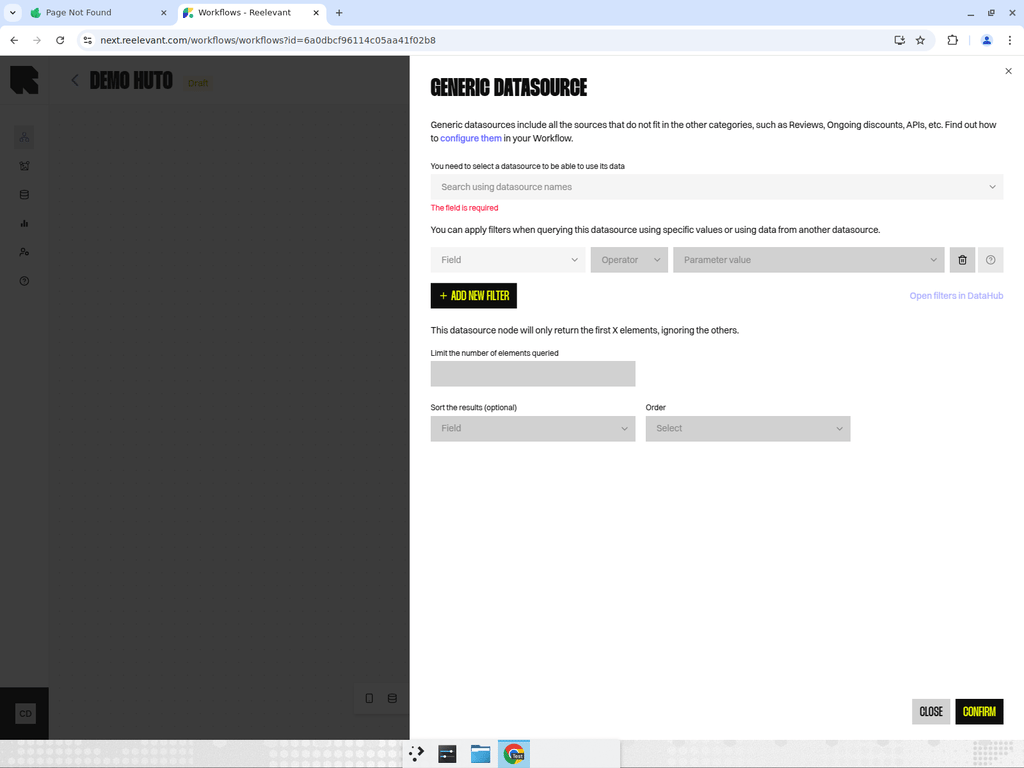
Datasource nodes connect to data you’ve imported in DataHub. There are three specialized types, each optimized for a specific data category.Generic Datasource
For data that doesn’t fit product or location categories — reviews, promotions, API feeds, CRM data, etc. Configuration:- Select a datasource — Search and pick from your imported datasources.
- Filters — Apply rules to narrow down results. Filters can use static values or reference data from other nodes in the workflow.
- Ordering — Customize result order: keep default, change every 10 seconds for everyone, or change for each person.
- Location data — Optionally include location data if your datasource contains geographic information.
Product Datasource
Designed specifically for product catalog data. Includes additional features for product-specific use cases. Configuration:- All the same options as Generic Datasource, plus:
- Combinatorial products — Enable to create product combinations.
- Group results by — Group products by a field (e.g., brand, category) with output modes:
- Aggregated data
- First product of every group
- All products of the first group
- All products of all groups
Location Datasource
For store locator and location-based personalization. Finds locations near a given point. Configuration:- Address — The reference address to search from (can be static or dynamic from another node).
- Distance (km) — Maximum radius to search within.
- Filters — Additional filtering rules.